A lot of businesses start shopping for contact center software after the same pattern shows up for weeks or months.
Calls ring too long. One agent knows how to handle billing, another knows scheduling, but the phone tree sends people to whoever is free. Customers repeat their issue twice. A lead who wanted to book an appointment hangs up after lunch because no one called back. Your team works hard, but the system keeps making simple work harder than it should be.
That's the moment when a company says it needs a better phone system.
Usually, that's only partly true.
The core need is a better operating system for customer conversations. Good contact center software doesn't just move calls from point A to point B. It decides where interactions should go, what the agent should know before answering, what should be automated, what should be recorded, and what should happen after the conversation ends. If someone wants to ask a question, make a payment, check an order, or book an appointment, the system should make that easy without adding friction for the customer or manual work for the team.
The important shift is this: stop judging platforms by how many features they list, and start judging them by how those features work together. That's where the gains in efficiency, service quality, and cost control come from.
Beyond a Better Phone System
A growing business often reaches a point where the old setup starts breaking in visible ways.
The front desk answers overflow calls between other tasks. Sales reps return missed calls from sticky notes or inbox alerts. Support staff bounce between a desk phone, a CRM, and a scheduling calendar. None of those tools share context well, so every conversation starts cold. Customers feel that immediately.
One of the clearest failure points is appointment handling. A prospect calls after hours to book an appointment. They get voicemail. The next morning, someone has to listen to the message, enter the details manually, call back, and hope the time slot is still open. That isn't just clunky. It creates revenue leakage and customer frustration from a routine interaction.
What the software is really replacing
Contact center software replaces much more than a handset or PBX. It becomes the control layer for inbound calls, outbound outreach, digital channels, routing logic, reporting, call recording, and workflow automation.
That matters because customer communication problems rarely come from one missing feature. They come from disconnected steps.
- The call arrives but lacks context: The agent answers with no customer history.
- The team has channels but no continuity: Chat, email, SMS, and voice live in separate tools.
- Scheduling is available but not connected: A customer can request time, but the system can't book an appointment automatically.
- Managers can see volume but not causes: Reports show queues are long, but not where handoffs are failing.
Contact center software works when it removes handoffs, not when it adds another dashboard.
What changes when the system is designed correctly
When the platform is built well, routine conversations stop consuming senior staff time. Basic requests move through self-service or automation. Agents receive the interaction with customer context already attached. Supervisors can see queue pressure early instead of learning about it from angry customers.
That's why strong contact center software features should be viewed as an operating model. You're not buying buttons on a screen. You're defining how your business will answer, route, resolve, follow up, and book appointments at scale.
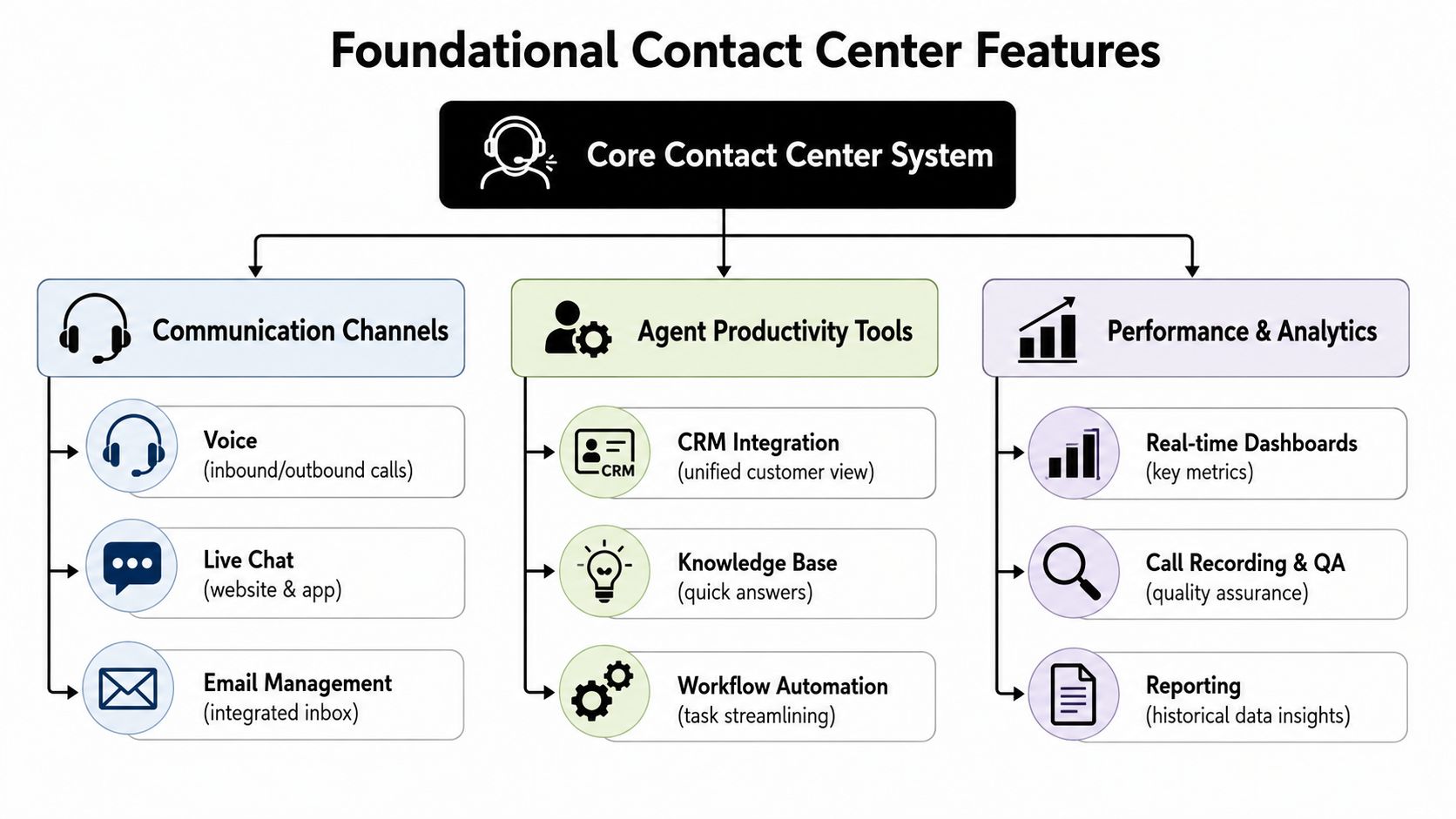
The Foundational Features Every Contact Center Needs
The baseline has changed. About 49% of businesses have already adopted call center software, and another 24% plan to implement it within the next two years, according to a 2025 call center software benchmark summary from LiveAgent. That's why features like cloud deployment, agent performance monitoring, and analytics aren't premium extras anymore. They're standard buying criteria.
Routing that fixes the first mistake
The first foundational feature is automatic call distribution, or ACD.
Most businesses think of ACD as simple call routing. In practice, it's the rule engine that decides who should receive an interaction based on queue, agent skill, availability, priority, or business hours. If your current setup sends every caller into the same bucket, ACD is one of the fastest ways to reduce unnecessary transfers.
What it solves:
- Wrong first contact: Customers reach the wrong department and start over.
- Uneven workloads: One agent is buried while another sits idle.
- Poor queue discipline: High-value or urgent interactions wait behind lower-priority ones.
A basic phone system can ring multiple extensions. A real contact center platform applies logic.
IVR that does more than block callers
The second core feature is interactive voice response, or IVR. Too many teams build IVR menus that act like a wall between the caller and help. Good IVR should act like a receptionist with rules.
Use it for tasks that are repetitive, predictable, and safe to automate. That includes directing callers, collecting simple intent, confirming office hours, and helping someone book an appointment or request one without waiting on hold. Don't use it to hide staffing problems behind endless menus.
Practical rule: If your IVR makes a customer listen longer than it saves them, it needs redesign.
Recording, dashboards, and the minimum viable management layer
Once calls are routed correctly, managers need visibility. That means call recording, real-time dashboards, and historical reporting.
These features matter for different reasons:
| Feature | What it does | Why it matters |
|---|---|---|
| Call recording | Captures interactions for review | Helps with quality assurance, dispute review, and training |
| Real-time dashboards | Shows queue activity as it happens | Lets supervisors react before service levels slip |
| Reporting | Summarizes patterns over time | Helps leaders spot repeat issues, staffing gaps, and channel trends |
This is also where a cloud platform earns its keep. A modern cloud contact center software platform should let agents work from anywhere, keep reporting centralized, and avoid the old problem of managing separate on-premise systems for voice, recording, and analytics.
The quiet feature that matters more than buyers expect
CRM integration belongs in the foundational tier, not the advanced tier.
Without it, agents waste time searching for account history, logging notes after the call, and asking customers for information the company already has. With it, the agent can answer with context, confirm prior interactions, and continue the conversation instead of reconstructing it.
For businesses that rely on consultation requests, field service dispatch, intake, or appointment-based workflows, these operational basics start turning into measurable gains. A customer calls. The screen pops with history. The queue routes properly. The call is recorded. The outcome is logged. If needed, the system helps book an appointment and trigger the next step. That is the baseline now.
Advanced AI Features That Drive Growth
The biggest mistake I see with AI in contact centers is treating it like a novelty layer. It isn't. It's now part of the operating model for teams that need to handle more interactions without letting service quality collapse.
Gartner expects 1 in 10 customer interactions to be automated, and Webex notes that AI agents can account for up to 95% of contact center costs, which is why platforms now emphasize AI-driven IVR, chatbots, ACD, and analytics in their core design, as outlined in Webex's contact center technology trends discussion.
Omnichannel stops context loss
A mature platform doesn't treat voice, email, chat, SMS, and social as separate departments. It brings them into one agent workspace so the conversation follows the customer.
That matters because queue pressure often shows up in voice first. If digital channels absorb simple requests well, the phone queue gets reserved for interactions that need a human. According to Nextiva's explanation of enterprise contact center orchestration, omnichannel orchestration lets routing and context follow the customer across channels, reducing handoff friction while AI self-service can deflect routine requests and improve handling efficiency.
In practice, this is what buyers should look for:
- A unified desktop: Agents shouldn't toggle across disconnected inboxes.
- Persistent conversation history: If a customer starts on chat and calls later, the context should stay intact.
- Shared workflow triggers: If someone asks to reschedule or book an appointment, the action should update the same customer record regardless of channel.
AI voice and chat are most useful on repeatable work
The strongest AI use cases are narrow, high-frequency tasks with clear outcomes.
That includes answering common questions, capturing intent, qualifying inbound leads, routing by need, collecting callback details, and helping customers book an appointment directly into a calendar. When that works well, the AI isn't replacing your team. It's removing queue-clogging work that doesn't need a person every time.
A practical example is an AI receptionist for appointment handling and call automation. Used correctly, this type of tool can answer after hours, collect caller details, schedule meetings, and hand off more complex interactions to a live agent with the context preserved.
Predictive dialing and real-time assist
AI isn't only for inbound support.
For outbound-heavy teams, predictive dialers improve agent utilization by dialing automatically and connecting agents only when a live person answers, while skill-based ACD and real-time AI assistance improve fit and consistency in complex queues, as described in Webex's overview of must-have contact center capabilities.
That combination matters in three settings especially:
- Sales teams: Less idle time, more live conversations, better lead handling.
- Collections or reminders: Better pacing across high-volume outreach.
- Support environments with tiers: Complex issues reach agents with the right expertise faster.
The right AI feature saves time before, during, and after the interaction. If it only creates a flashy demo, it won't survive daily operations.
Tailoring Features for Your Industry
A feature list means very little until it matches the work coming into the queue.
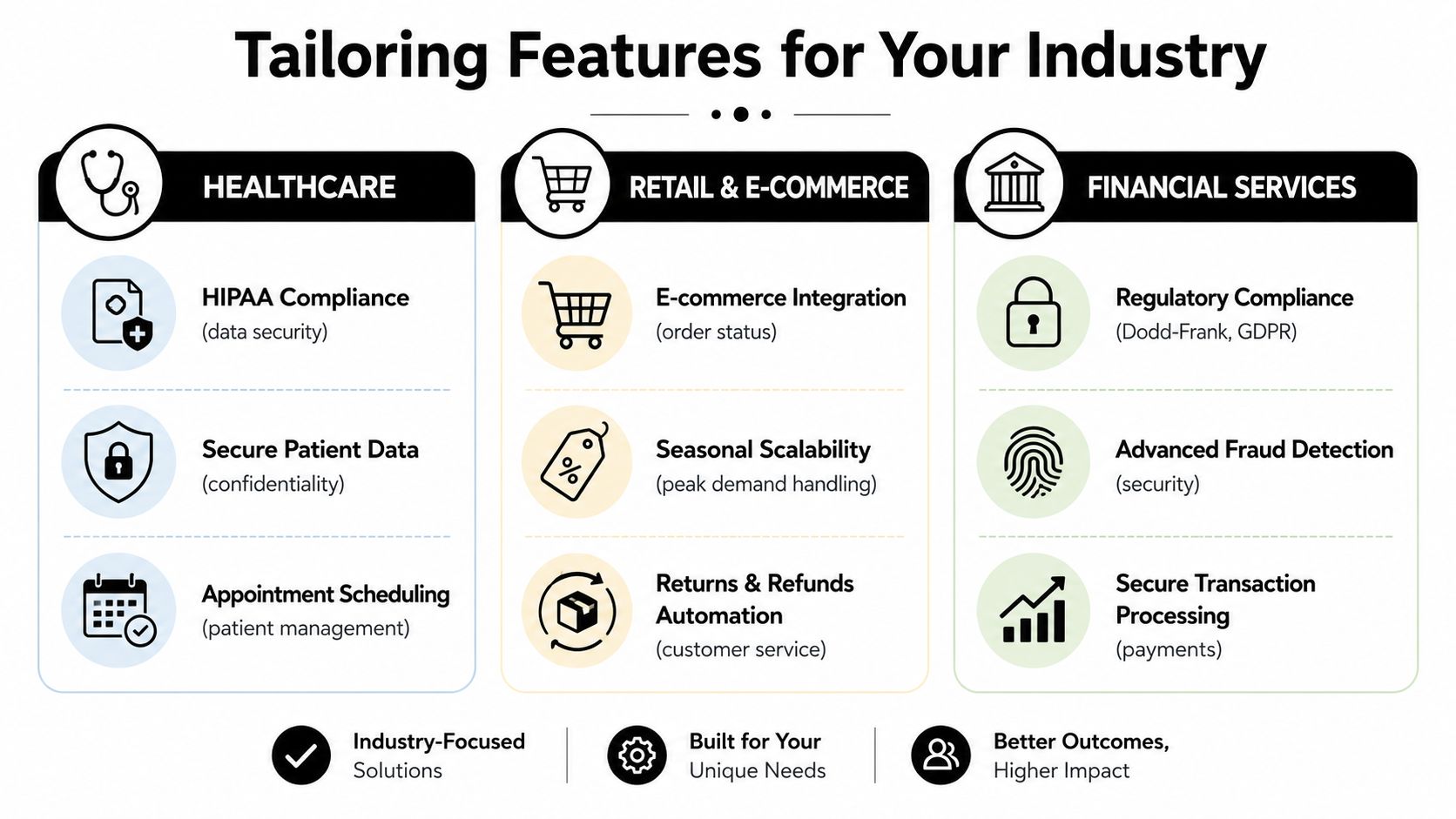
A dental office dealing with appointment changes has different operational pressure than an e-commerce team handling returns, or a financial services group managing identity checks and audit requirements. All three may buy the same platform category. They should not configure it the same way. The key decision is how routing, records, automation, and agent context work together in each environment.
Healthcare and dental practices
Healthcare teams usually feel the pain first at the front desk. Phones stack up, patients need to reschedule, staff are tied up confirming visits, and urgent calls cannot sit in the same flow as routine questions.
The feature mix should reflect that reality:
- Privacy and access controls: Patient information needs to stay contained across voice, messaging, and scheduling systems.
- Scheduling workflows: Intake, reminders, confirmations, and calendar updates should connect in one process.
- Priority routing: Urgent or clinical calls need a faster path than billing questions or routine appointment requests.
In this setting, orchestration matters more than feature count. If the system can identify the caller, pull the patient record, offer self-service for simple changes, and pass exceptions to staff with context already attached, it reduces hold time and administrative rework. If it only records a voicemail or drops a generic ticket into a queue, staff still have to rebuild the interaction by hand.
Retail and e-commerce
Retail support volume shifts fast. A promotion, shipping delay, or stock issue can change the queue in a few hours. That makes channel switching and order context more important than a polished phone menu.
A practical retail setup usually focuses on these combinations:
| Retail need | Feature that matters | Why |
|---|---|---|
| Order status requests | Self-service plus CRM or order-system integration | Keeps repetitive contacts out of the voice queue and gives agents full order context when escalation is needed |
| Peak season surges | Cloud capacity plus queue management | Helps the team absorb temporary spikes without rebuilding workflows |
| Returns and exchanges | Workflow automation plus case history | Cuts repeat explanation from customers and lowers handle time across multi-step issues |
The common failure point is handoff. A customer starts in chat, moves to voice, and has to repeat the order number, item, and issue because the channels do not share context. Retail teams get better results when those pieces work as one process instead of separate tools.
Financial services and legal environments
These environments pay for mistakes twice. First in longer handling time, then in compliance risk.
Legal practices often need detailed call records, secure handoffs, and clean notes because conversations can affect billing, case timelines, or documentation. Financial services teams need stronger authentication steps, controlled workflows around sensitive transactions, and clear records of what happened during each interaction.
Automation still has value here, but the handoff points need to be defined clearly. If a system collects intake details, schedules a consultation, or walks a caller through identity-related steps, teams need rules for where automation ends, what gets logged, and when a person must take over. Good orchestration reduces risk because the agent receives the full history, not a partial transcript and a guess.
Sales organizations need speed and fit
Sales teams care about a different chain of events. Lead comes in. The system identifies the account or campaign source. Routing sends it to the right rep. The CRM screen loads immediately. Follow-up activity gets logged without extra admin work.
That is why sales leaders should evaluate feature combinations, not isolated tools. Predictive dialing can raise talk time in outbound teams, but only if contact rules, lead assignment, CRM syncing, and call outcomes all stay aligned. Skill-based routing helps too, especially when territory, product line, or deal stage should determine who gets the conversation.
A sales stack that looks good in a demo can still waste money in production. If reps have to search for lead history, re-enter notes, or fix bad routing after every transfer, the dialer is not solving much. The better setup keeps reps in live conversations and cuts the admin work around them.
Your Feature Selection and Implementation Checklist
Feature lists are cheap. Orchestration is where the money is.
Most vendor comparisons show the same grid: IVR, recording, analytics, omnichannel, CRM integration, AI, dialer. That list doesn't tell you whether the tools share data in real time, whether the CRM updates both ways, or whether an automated flow can complete work such as sending confirmations after a customer books an appointment.
Ask how the pieces work together
The most useful guidance on modern contact center software features is about integration depth, not feature presence. Vonage's discussion of contact center software types and integrations makes the point clearly: its value lies in how routing, recording, analytics, and CRM screen pops work together, and advanced analytics often rely on deep, bidirectional integration with CRM, QA, and workforce management systems.
Here are the questions that reveal whether a platform is orchestrated:
When a call arrives, what data appears instantly?
If the answer is "the agent can click into the CRM," that's weaker than a real-time screen pop with usable context.Can automation complete a workflow, not just start one?
For example, if a caller wants to book an appointment, can the system check availability, write the booking into the calendar or CRM, and trigger a confirmation?What happens during escalation?
If chat moves to voice or an AI interaction hands off to an agent, does the context move too?How much manual logging remains?
A platform with many features can still waste agent time if notes, tags, or dispositions need to be entered in multiple systems.
Buy the workflow, not the feature count.
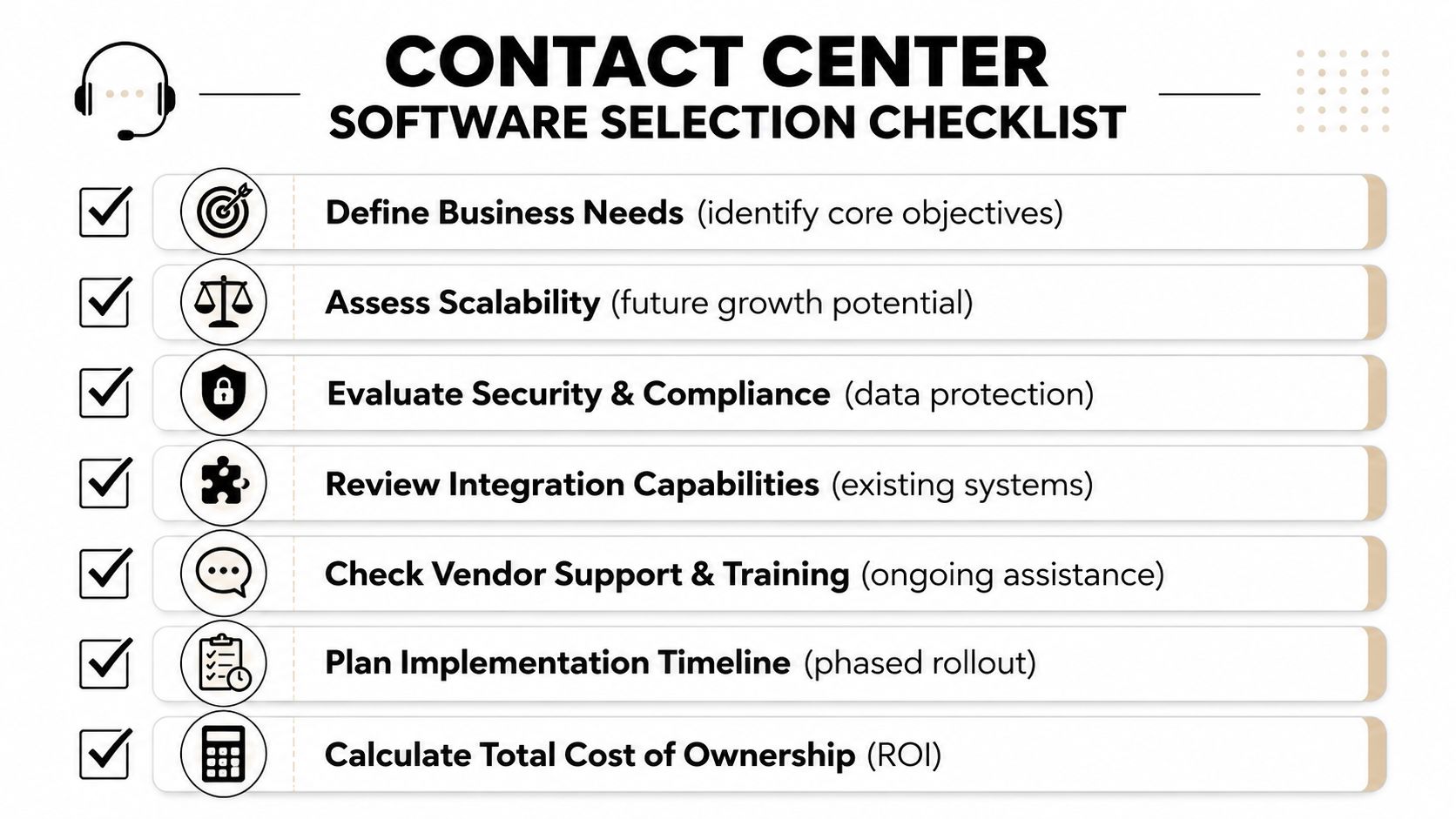
Use a selection checklist that reflects operations
A practical buying checklist should cover more than product marketing.
- Business objectives first: Define whether your primary problem is missed calls, poor routing, weak reporting, manual scheduling, or low outbound productivity.
- Integration review: Test CRM sync, calendar sync, knowledge access, and whether data moves both ways.
- Security and compliance fit: Make sure the controls match your industry before rollout, not after.
- Scalability check: Ask how new queues, users, channels, and locations get added.
- Support model: Confirm who handles onboarding, training, and post-launch issues.
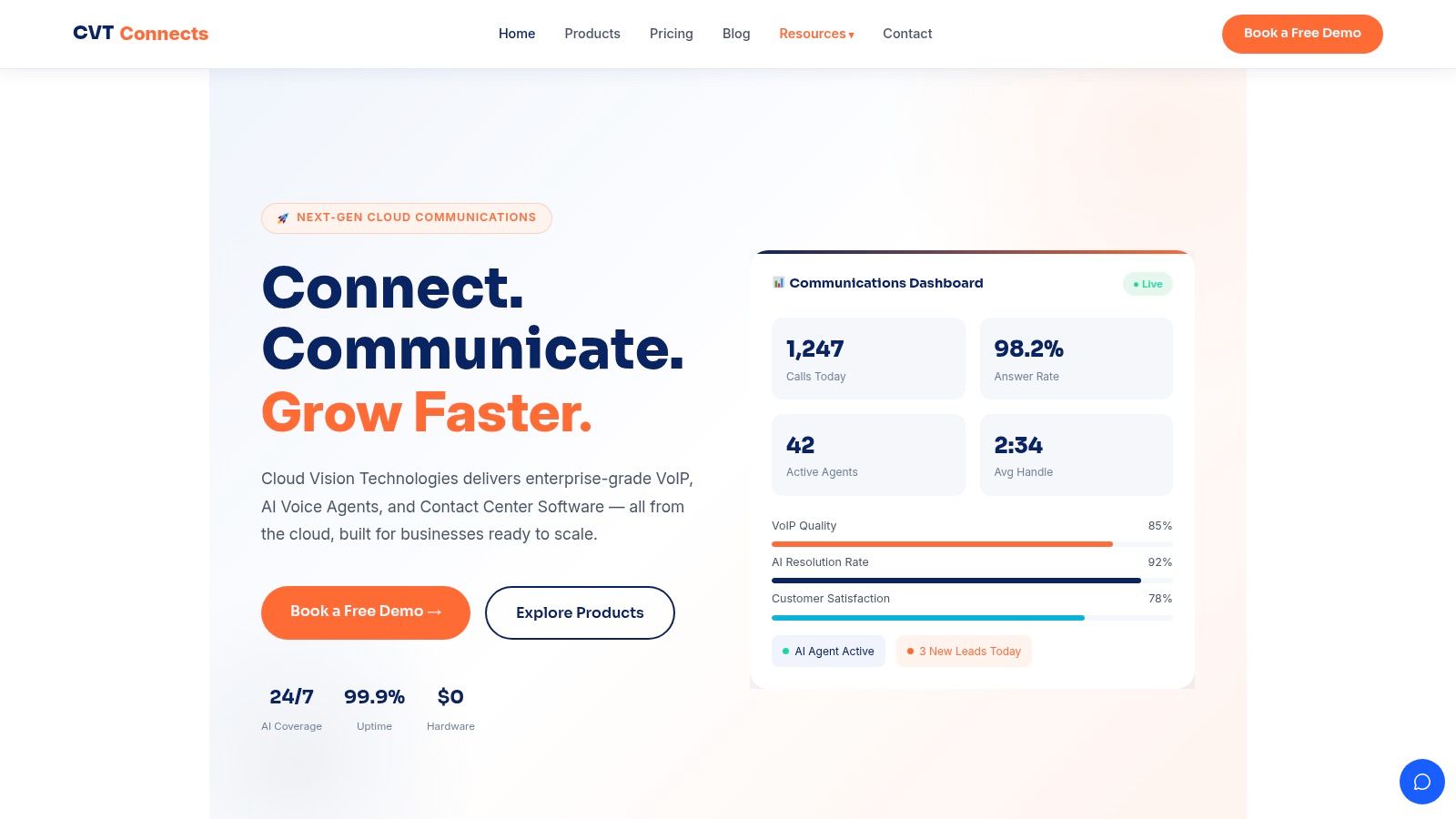
Cloud Vision Technologies LLC is one example of a provider that combines cloud PBX, AI voice handling, contact center tools, predictive and power dialing, live monitoring, dashboards, and CRM-connected workflows in one platform. The key evaluation point, as with any vendor, is whether those functions operate as a single system rather than a bundle of separate modules.
Implementation usually fails in the handoff details
Most rollouts go wrong in familiar places:
- agents aren't trained on new routing behavior
- old data doesn't map cleanly into the new system
- managers don't define queue ownership
- automation launches without clear fallback paths
- appointment booking logic isn't tested for edge cases
The cleaner approach is phased rollout. Start with a high-volume queue or one workflow that causes daily friction. Validate routing, screen pops, recording, and post-call actions. Then expand. That reduces disruption and exposes bad assumptions before they spread across the whole operation.
Security Uptime and Calculating Your ROI
Security and uptime sound technical until the phone system fails during business hours or customer data moves through an AI workflow without clear controls. Then they become operating issues immediately.
A contact center platform should protect conversations, preserve records correctly, and keep the business reachable when volume spikes or one component fails. If you handle support, intake, scheduling, or sales, downtime doesn't just frustrate customers. It interrupts revenue, follow-up, and service continuity.
Security is really workflow control
Most buyers ask whether the platform is secure. The better question is whether the workflows are controlled.
That means asking who can access recordings, how transcripts are stored, what happens when AI summarizes a sensitive conversation, and where automated actions should stop. AI features such as auto-summaries, transcription, and sentiment analysis are useful, but Upland's contact center software guidance notes that buyers need to ask when AI should assist versus automate, how accurate the transcripts are, and what governance is required, especially in compliance-sensitive environments.
If you can't explain where automation hands off to a person, you don't yet have governance. You have risk.
Uptime should be tied to business impact
A strong uptime commitment matters because contact centers are front-door systems. If they fail, callers don't care why.
Think about uptime in plain operational terms:
- Missed opportunities: New callers can't reach sales or schedule service.
- Broken service promises: Existing customers wait longer or abandon the interaction.
- Supervisor blind spots: Managers lose visibility right when queues become unstable.
This is also where resilience supports customer experience. A system that routes well but fails during busy periods isn't reliable enough for appointment-based businesses or high-volume support environments.
Build ROI from labor, leakage, and quality
ROI gets clearer when you tie it to concrete workflows instead of vague productivity language.
Start with questions like these:
| ROI area | What to examine |
|---|---|
| Manual work removed | How much agent time goes into note-taking, logging, and simple scheduling tasks |
| Revenue leakage reduced | How many prospects fail to book an appointment after hours or during hold times |
| Better routing | How often calls transfer, queue incorrectly, or reach agents without context |
| QA efficiency | How long supervisors spend reviewing interactions and coaching manually |
A practical next step is to use an ROI calculator for cloud communications and contact center investments to model where time savings and service improvements might show up in your operation.
For a deeper walkthrough of what modern communications platforms can support, this overview is useful:
The best ROI cases usually come from stacking small operational wins. Better routing reduces transfers. AI handles routine intake. Recording and summaries speed QA. The scheduling flow helps customers book an appointment without waiting for a callback. No single feature does all the work. The orchestration does.
Frequently Asked Questions About Contact Center Software
How is an AI voice agent different from a basic IVR
A basic IVR presents menu paths. An AI voice agent can understand natural language, capture intent, answer routine questions, and complete tasks such as helping a caller book an appointment. The important distinction is execution. A menu routes. A stronger AI workflow can resolve.
What's the difference between multichannel and omnichannel
Multichannel means you offer multiple contact options. Omnichannel means those options share context. If a customer starts on chat and later calls, omnichannel software should preserve the interaction history so the next agent doesn't start from scratch.
Can contact center software integrate with a custom CRM
Often, yes. But the key question isn't whether an integration exists. It's whether the integration is deep enough to support screen pops, real-time updates, call logging, and workflow triggers without forcing agents into duplicate data entry.
How long does implementation usually take
It depends on routing complexity, data cleanup, integrations, compliance requirements, and how many teams you're moving at once. Straightforward cloud deployments move faster than heavily customized legacy replacements. The safest approach is usually a phased rollout by queue or use case.
Which feature should a growing business prioritize first
Start with the feature that fixes the most expensive friction. For some teams that's skill-based routing. For others it's CRM integration, call recording, or after-hours automation that lets customers book an appointment instead of leaving voicemail.
Are AI features always worth paying for
No. Some save time every day. Others create extra review work. Evaluate AI features by whether they reduce handling effort, improve handoffs, support quality assurance, or remove manual steps from real workflows.
Cloud Vision Technologies LLC helps businesses replace legacy phone systems with integrated cloud communications, including Hosted VoIP, AI voice automation, and cloud contact center tools for routing, recording, analytics, and appointment booking. If you're evaluating how these workflows should fit together in your environment, Cloud Vision Technologies LLC is one option to review.