If you're looking at an aging phone closet, a few analog desk phones that still work, a fax line someone refuses to retire, and a push to move everything to the cloud, you're in the exact situation where an ATA enters the conversation.
For many small and mid-sized businesses, an ATA solves a real migration problem. It lets you keep selected analog devices in service while the rest of your phone system moves to VoIP. That can be sensible. It can also become a crutch that drags out a half-finished migration, adds support overhead, and leaves you with legacy hardware in the middle of a modern communications stack.
The smart question isn't just whether an ATA adapter for VoIP works. It usually does. The better question is whether it belongs in your environment as a short-term bridge, a long-term fixture, or not at all. If you want help sorting that out, it's worth booking an appointment with a telecom advisor before buying hardware you may regret later.
What an ATA Is and How It Works with VoIP
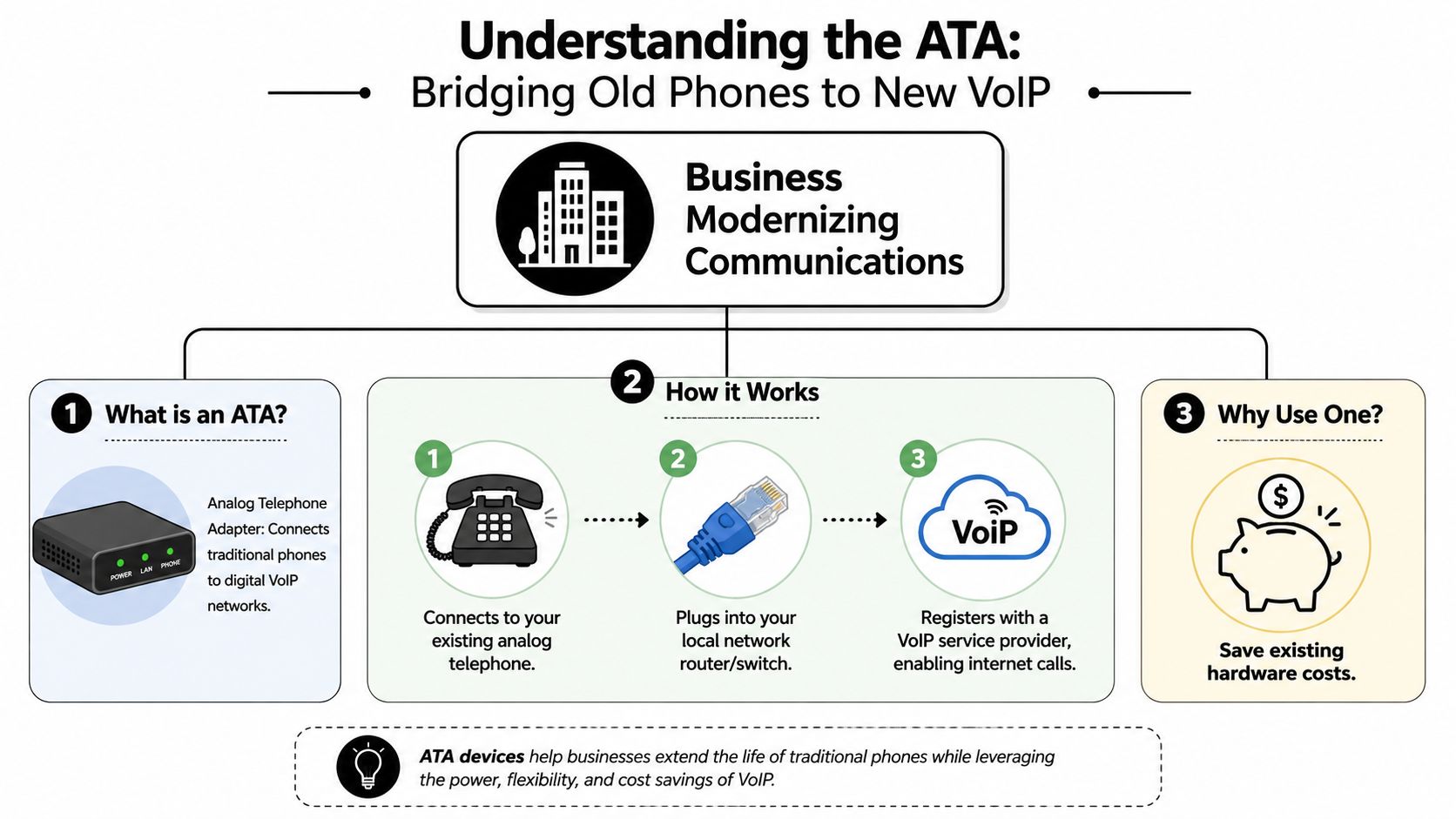
An analog telephone adapter, or ATA, is the device that lets old analog equipment operate on an IP voice network. A useful plain-English definition comes from VoIP Studio's ATA overview, which explains that an ATA is the bridge between legacy analog devices and VoIP because it converts analog voice into digital packets and back again, while also handling signaling such as dial tone, caller ID, and touch-tone interpretation.
That sounds technical, but the working idea is simple. The ATA acts like a translator between two different systems that don't naturally speak the same language.
What the device actually does
Your analog phone or fax machine sends a traditional analog signal. Your VoIP provider expects internet-based voice traffic. The ATA sits in between and handles the conversion.
A basic flow looks like this:
- Analog device connects to the ATA. That might be a desk phone, fax machine, or paging interface.
- The ATA connects to your network through Ethernet.
- The ATA registers with the VoIP service so calls can move between your analog device and the IP phone system.
If you're researching ATA adapter VoIP options, this is the core value. You don't have to replace every analog endpoint on day one.
FXS and FXO in plain English
People often get lost in port terminology. Here's the practical version:
- FXS port means the ATA provides the line connection your analog phone plugs into.
- FXO port usually refers to connecting toward a traditional phone line or line-side service.
In most small business ATA deployments, the important thing is whether the adapter gives you the right analog ports for the devices you want to keep. For a standard analog phone or fax machine, you're usually focused on FXS connectivity.
Practical rule: If your goal is to keep an old phone, fax machine, or analog paging interface alive during a cloud migration, the ATA is a bridge, not a reinvention of the device.
Why businesses still use them
The primary appeal is operational, not nostalgic. Businesses used ATAs heavily during the move from traditional telephony to VoIP because they could keep existing phones, fax machines, and some PBX-related equipment in place instead of replacing everything immediately. That lowered friction and made cloud calling easier to adopt in environments where budgets, cabling, or change management slowed a full refresh.
That's why ATA devices still show up in offices, clinics, hospitality properties, and smaller multi-room sites. They let you modernize the service layer first, then decide which analog hardware is still worth keeping. If you're unsure where your environment falls, booking an appointment before rollout can prevent a temporary bridge from becoming a permanent headache.
Common Business Use Cases for VoIP Adapters
The most practical ATA projects aren't flashy. They're selective. A business keeps the devices that still serve a purpose, moves the core calling platform to VoIP, and avoids replacing hardware that doesn't yet justify replacement.
One common scenario is the low-priority phone nobody wants to spend money on. Think break rooms, warehouse stations, back-office counters, utility rooms, or lobby courtesy phones. Those sets don't need advanced collaboration features. They just need to ring, transfer cleanly, and stay available. In that situation, an ATA often makes sense.
Where ATAs still earn their keep
The more interesting use cases are the ones people skip over.
According to industry coverage discussing ATA support for analog telephones, fax machines, and paging systems, ATAs are commonly used to preserve analog equipment rather than replace it outright, including in mission-critical workflows in healthcare and legal settings. That's the key distinction. The question isn't only about voice handsets.
Consider a few real-world patterns:
- Fax retention in regulated workflows. Some firms still have fax processes tied to intake, records, or signatures.
- Overhead paging integration. Warehouses, schools, clinics, and older offices may rely on paging hardware that's expensive to redesign.
- Analog room or courtesy phones. Hospitality, common areas, and older facilities often have basic devices that don't need a full IP phone feature set.
What works well and what needs caution
An ATA works best when the analog endpoint has a narrow, stable purpose. A simple phone in a warehouse office is a good fit. A paging adapter tied to a known workflow can also be a reasonable fit.
Where businesses get into trouble is assuming every analog device deserves preservation. That's rarely true. A fax line that supports a real operational process may justify an ATA. A random collection of aging desk phones spread across the office usually doesn't.
Keep analog gear only when it supports a workflow you still need. Don't preserve hardware just because it hasn't failed yet.
Another strategic clue comes from the rest of your communications roadmap. If your team also needs queues, reporting, omnichannel routing, or more structured customer handling, an adapter alone won't get you there. That's where a cloud platform and, in some cases, a broader cloud contact center strategy belong in the discussion.
A phased migration use case
The best ATA deployments are often phased migrations:
- Phase one keeps a few analog endpoints running.
- Phase two moves users to native IP phones or softphones.
- Phase three retires the leftover analog devices that no longer make business sense.
That sequence gives you control. It also keeps the ATA in the role it handles best. A tactical bridge. Not the center of your long-term communications design. If you need help mapping which devices stay and which should go, booking an appointment is the fastest way to avoid overbuying adapters.
Step-by-Step ATA Setup and Troubleshooting
ATA setup is usually manageable, but it isn't plug-and-forget in the way many buyers expect. You have a hardware device, a network path, and provider credentials that all have to line up. When one piece is wrong, the failure often looks simple on the surface. No dial tone. Can't register. One-way audio. The cause may be somewhere else entirely.
Consequently, many businesses realize an ATA is still part of telephony engineering, even if the box itself looks small.
The usual setup sequence
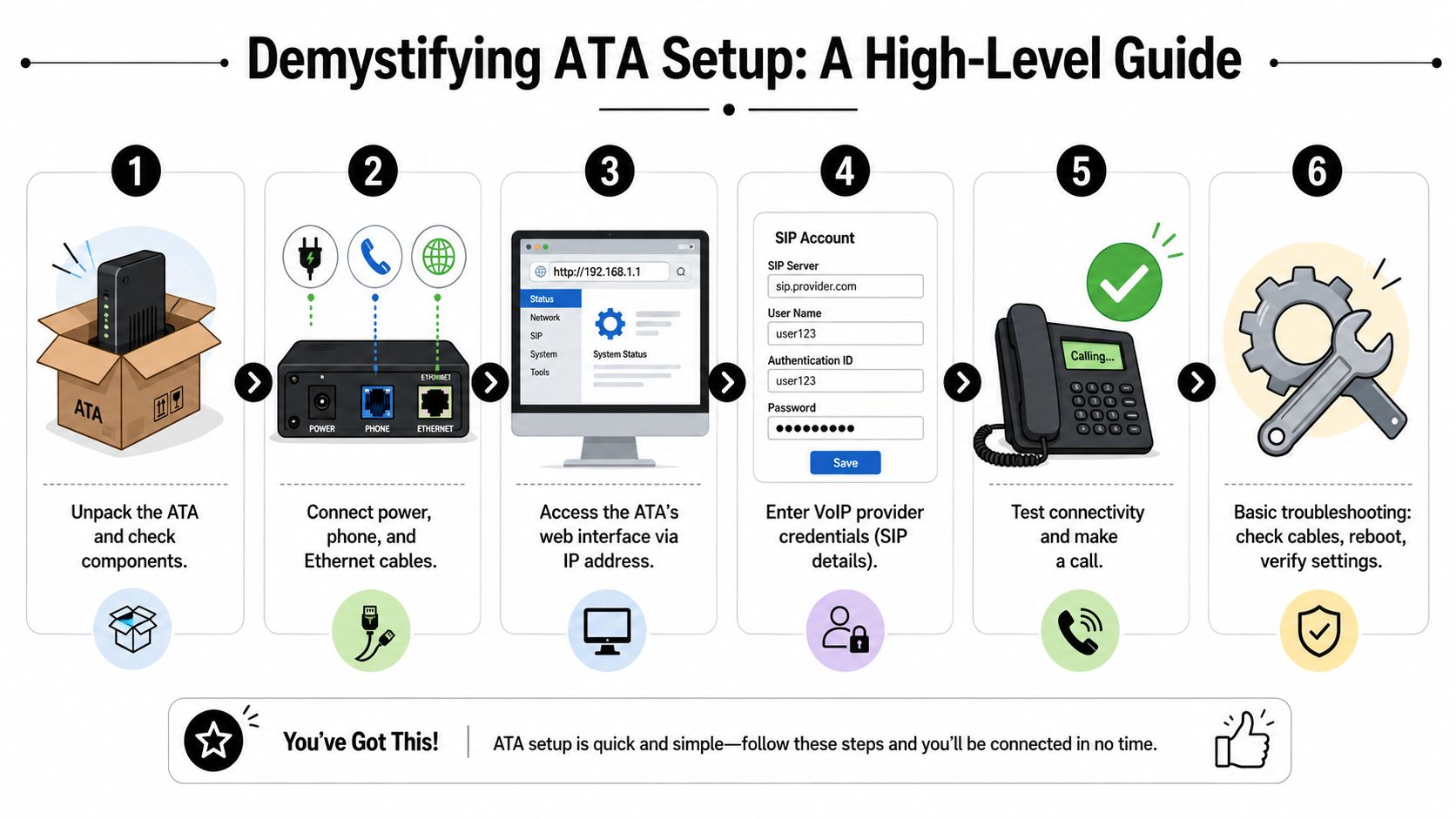
Most deployments follow the same broad pattern:
Connect the analog device to the ATA
Plug the phone, fax machine, or analog endpoint into the appropriate port.Connect the ATA to the local network
The adapter needs Ethernet access so it can reach the VoIP service.Power up the unit and access its admin interface
Most ATA devices provide a web-based configuration panel.Enter the SIP account details from your provider
This is what allows the adapter to register on the VoIP platform.Test calling behavior
Check inbound calls, outbound calls, caller ID, and any feature the endpoint depends on.Document the setup
Port assignments, credentials ownership, and device purpose should be written down. Otherwise support becomes guesswork later.
A useful example from Cisco's ATA 190 Series datasheet is the Cisco ATA 192, which exposes two independent FXS ports that can be configured as separate SIP registrations. In plain terms, one device can map two analog endpoints into separate VoIP identities without requiring a full gateway.
What business owners should expect
A small ATA rollout is rarely the hard part. Ongoing support is.
If a provider supplies guided provisioning, onboarding goes much smoother. If not, you're depending on in-house staff or your telecom partner to align hardware settings, provider compatibility, and call behavior. That's why a structured VoIP onboarding process matters even for a modest adapter deployment.
A successful ATA install isn't just "the phone works." It's "the device behaves predictably after reboots, outages, credential changes, and support handoffs."
Common problems and likely causes
Here's a simple troubleshooting view:
| Symptom | Likely issue | First check |
|---|---|---|
| No dial tone | Registration failure or port issue | Verify credentials and physical connection |
| Can't make outbound calls | Provider config or dial plan mismatch | Confirm account status and call permissions |
| One-way audio | Network path problem | Review firewall and routing behavior |
| Fax instability | Codec or signaling mismatch | Confirm provider guidance for fax handling |
| Device worked, then stopped | Provisioning drift or firmware issue | Check saved config and update path |
The practical lesson is that ATA support involves more than plugging in a box. If you're not prepared to own those moving parts, booking an appointment before purchase is much cheaper than troubleshooting a fragile setup after go-live.
The Hidden Limitations and Security Risks of ATAs
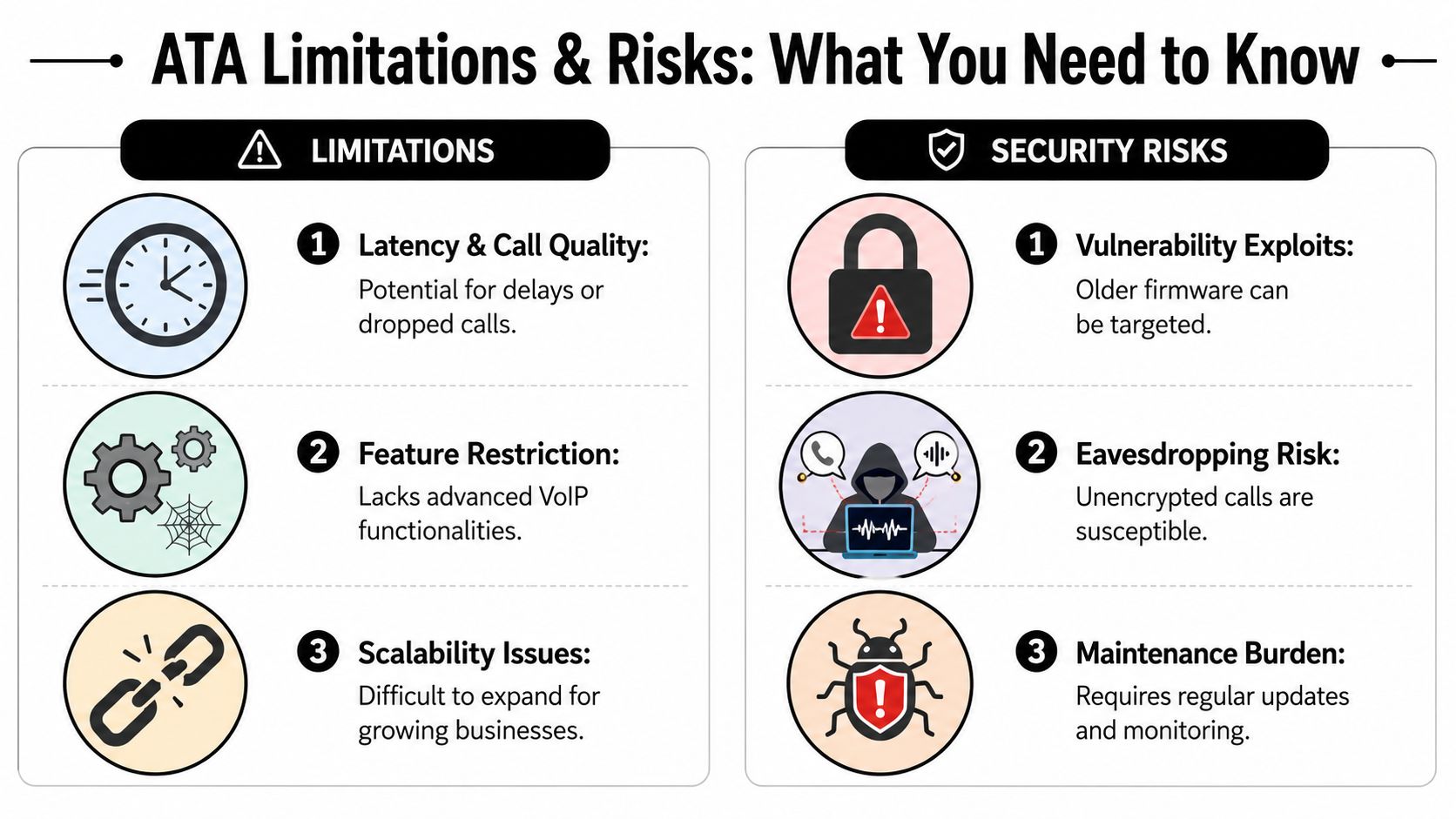
An ATA solves one problem cleanly. It keeps analog hardware alive on a VoIP service. But it also preserves the constraints of analog hardware while adding a new dependency on network quality, local power, and device management.
That trade-off is often underestimated. Teams see a cheap adapter and assume they've found a simple answer. In reality, they may have inserted another point of failure into the voice path.
Reliability is where ATA projects get exposed
A direct warning appears in WhichVoIP's discussion of phone adapter limitations: ATAs can become a reliability bottleneck if network quality, power backup, or device provisioning is weak, and their behavior during NAT and firewall traversal can be unpredictable in cloud environments.
That matches what many IT teams eventually find in practice. The analog device may be fine. The provider may be fine. The weak spot is the adapter sitting between them.
Common reliability issues include:
- Power dependency. If the ATA loses power, the analog endpoint goes dark with it.
- Network sensitivity. A degraded local network can hurt call quality or registration stability.
- Provisioning drift. Devices configured manually are easier to misconfigure later.
- Remote deployment friction. Hybrid and branch deployments expose edge cases fast.
Security isn't automatic
Small voice appliances often get less scrutiny than firewalls, laptops, or servers. That's a mistake.
Any network-connected voice device needs password hygiene, firmware management, and administrative control. If an ATA is deployed with weak credentials, outdated software, or poor ownership, it becomes another unmanaged endpoint on the business network.
A few risk patterns show up repeatedly:
- Default or shared credentials make support convenient but weaken accountability.
- Old firmware can linger for years because the device "still works."
- Undocumented admin access creates confusion when staff or vendors change.
- Shadow deployments happen when a branch office adds an adapter without IT oversight.
The cheapest ATA deployment often becomes the most expensive one to support, because nobody planned for network tuning, device lifecycle, or security ownership.
Feature loss matters more over time
The other limitation is strategic. An analog phone behind an ATA is still an analog phone. It won't become a modern collaboration endpoint just because the transport changed.
What businesses miss over time is the opportunity cost:
- New users want mobile apps, not hallway handsets.
- Managers want visibility into calls, routing, and reporting.
- Support teams want integrated workflows, not isolated analog endpoints.
- Remote staff need flexibility that fixed analog hardware can't provide.
This doesn't mean ATAs are bad. It means they should be used on purpose. If a device supports a narrow business function, keep it temporarily or selectively. If you're trying to modernize the whole communications environment, an ATA is usually a patch, not a strategy. That's a good point to pause and consider booking an appointment before committing to more legacy-preserving hardware.
Buying Considerations and Provider Compatibility
If you've decided an ATA is justified, buy for fit, not for price alone. The adapter has to match your provider, your device type, and the business importance of the workflow it's supporting.
A key point is interoperability. As noted in this overview of standards-based SIP ATA deployment, modern ATA devices are built on standards-based SIP communications, which is what allows them to work across different VoIP providers and helped them become widely deployed during the shift from traditional telephony to cloud voice.
What to check before you buy
Use a short checklist:
- Port type and count. Make sure the ATA supports the analog endpoints you need to keep.
- Provider compatibility. Ask your VoIP vendor which ATA models they support and provision regularly.
- Provisioning model. A supported template is better than a manual one-off build.
- Fax and specialty device behavior. If you're keeping a fax machine or paging interface, confirm support before purchase.
- Management ownership. Decide who updates firmware, stores credentials, and handles resets.
Locked versus flexible hardware
Some ATA devices are tightly tied to one provider's provisioning ecosystem. Others allow broader SIP interoperability. Flexibility can be valuable, but only if your IT team can manage it.
For many SMBs, the safest path is simple. Pick a model your provider already supports, then validate the exact use case before rollout. If you also want to compare the larger economics of keeping analog hardware versus retiring it, a VoIP savings calculator can help frame the conversation.
A final buyer's note matters more than any spec sheet. Talk to your provider first. Then buy hardware. Not the other way around. If the analog device is business-critical, booking an appointment for a design review is the prudent move.
Modern Alternatives That Outperform an ATA Adapter
A common migration scenario looks like this. A company starts with one ATA to keep a fax line or paging connection alive. Six months later, that single exception has turned into a design standard. Old desk phones stay in place, more adapters get added, and the new VoIP system ends up carrying the support burden of legacy hardware.
That is usually the point to reassess the plan.
An ATA works best as a bridge for a small number of analog exceptions. Once a business starts preserving handsets at scale, better options usually exist. Native VoIP endpoints and cloud communications tools reduce conversion points, simplify support, and fit modern call flows much better.
Native IP phones versus analog phones behind an ATA
A native SIP phone connects directly to the VoIP platform. There is no analog conversion layer between the handset and the service. In practice, that usually means fewer device-specific issues, cleaner provisioning, and more predictable feature behavior.
It also changes what users can do day to day. Busy lamp fields, presence, programmable keys, directory sync, and platform-level call controls tend to work better on native IP phones than on legacy analog sets connected through an adapter.
The trade-off is simple. If the device itself still serves a real purpose, keep it. If the goal is to preserve a familiar handset while the rest of the business modernizes, replacing that endpoint is often the cleaner long-term move.
Softphones and mobile apps often solve the bigger problem
For many businesses, the strongest ATA alternative is not another piece of desk hardware. It is a software endpoint tied directly to the cloud phone system.
That shift matters most for teams whose work is no longer tied to one physical office location. Sales staff, field service teams, managers, hybrid employees, and after-hours responders often gain more from a business calling app than from keeping an old analog phone alive. Calls follow the user instead of the desk. Transfers, presence, voicemail access, and internal messaging become easier to manage across locations.
There is a trade-off here too. Softphones depend on user adoption, device policy, and network quality. Some employees still prefer a physical handset, and some environments need one. But if mobility and responsiveness matter more than preserving old wiring, software usually wins.
Where cloud-native platforms pull ahead
At this point, many businesses stop thinking only about dial tone and start thinking about workflows.
An ATA can keep a device connected. It does not modernize how calls are routed, how customer interactions are tracked, or how staff handle voice across multiple locations. Cloud-native platforms address those broader needs. They can bring calling, auto attendants, reporting, AI-assisted call handling, and contact center functions into one system, often without requiring on-premise phone hardware for every user.
Cloud Vision Technologies LLC is one example of that model. Its hosted VoIP, AI Voice Agent, and cloud contact center offerings reflect a different design choice from an ATA-heavy deployment. The focus shifts from preserving endpoints to improving how the business handles communication.
That distinction matters. Businesses do not outgrow ATAs because adapters stop passing dial tone. They outgrow them because the communication model around the adapter stays stuck in the past.
If the analog endpoint supports a narrow operational need, an ATA can be a sound bridge. If the role depends on visibility, routing, mobility, or reporting, cloud-native tools usually fit better.
A simple decision comparison
| Option | Best for | Weak spot |
|---|---|---|
| ATA with analog device | Temporary bridge for a fax machine, paging interface, courtesy phone, or other legacy exception | Adds hardware dependency, local failure points, and support overhead |
| Native SIP phone | Users who want a desk phone and need full VoIP features | Still requires endpoint procurement and management |
| Softphone or mobile app | Remote teams, mobile staff, and businesses reducing desk hardware | Depends on user training, endpoint policy, and network quality |
| Full cloud communications platform | Businesses updating calling, routing, reporting, and customer handling together | Requires process change and rollout planning |
When to leapfrog instead of adapt
Keeping a small ATA footprint makes sense in specific cases. Fax, overhead paging, door phones, alarm panels, and a few courtesy phones are the usual examples. Those are peripheral devices with narrow jobs. An adapter can buy time without doing much damage to the overall design.
The risk grows when analog phones remain central to daily operations. At that stage, the business is not just preserving a legacy edge case. It is carrying old hardware, extra failure points, and analog limitations into a system that could be much simpler.
The better long-term design usually has fewer adapters, fewer isolated devices, and more users on endpoints or apps built for cloud voice from the start.
Conclusion: Choosing Your VoIP Migration Path
An ATA has a legitimate role in VoIP migration. It keeps selected analog devices useful while the rest of the environment moves forward. For fax, paging, courtesy phones, and a small number of legacy endpoints, that can be the right call.
But the strategic risk is clear. The longer an ATA stays at the center of your design, the more likely it is to become a support burden instead of a bridge. You're still managing hardware, still dependent on local conditions, and still carrying the limits of analog devices into a cloud system that could do much more.
The right path depends on what you're trying to preserve. If the analog endpoint supports a narrow, important workflow, an ATA can buy you time. If you're modernizing communications across the business, a more cloud-native model usually gives you better flexibility, cleaner administration, and a better experience for users and customers.
Don't guess your way through that choice. Book an appointment and review your current phones, fax needs, paging requirements, and network conditions before you buy adapters or replace hardware. A short planning conversation can tell you whether an ATA belongs in your migration plan at all.
If you're weighing an ATA against a more modern phone setup, book an appointment with Cloud Vision Technologies LLC to review your current environment and get a practical migration path. That conversation can help you decide whether to keep a few analog endpoints with an ATA, replace them with native VoIP devices, or move directly to a hardware-light cloud communications model.