A customer calls your business. Your receptionist answers, asks for a name, opens one system for the phone, another for customer records, then a third for notes. The caller waits. The employee scrambles. If the call needs to be transferred, the whole process often starts again.
That kind of friction feels small when you hear one call. Across a full day, it becomes expensive. Sales conversations slow down. Support calls take longer than they should. Front-desk teams miss chances to help people immediately, including simple but valuable tasks like booking appointments while the caller is already on the line.
Computer telephony integration software fixes that disconnect. It links your phone system with the software your team already uses, so calls, caller details, records, routing, and follow-up actions happen inside one connected workflow instead of scattered across separate tools.
The High Cost of Disconnected Customer Calls
A disconnected call flow usually looks familiar.
A patient calls a dental office to book an appointment. The front-desk employee answers, asks for date of birth, opens the practice management system, places the caller on hold, comes back, and asks which provider they want. Then the employee checks the calendar in another screen. If the line rings again, attention shifts and the first caller waits longer.
The same pattern happens in other businesses. A sales rep gets an inbound lead but has to search the CRM manually before saying hello. A support agent answers with no ticket history visible. A property management office takes a maintenance call but doesn't have the tenant record open yet. None of this is dramatic. It's just slow, repetitive, and easy to get wrong.
Where the real cost shows up
When tools aren't connected, teams lose time in ways managers can see and ways they often can't:
- Longer conversations: Agents spend part of the call collecting information the system should already know.
- More hold time: Staff pause the conversation just to find records or confirm details.
- Messier handoffs: Transfers happen without context, so customers repeat themselves.
- Missed revenue moments: A caller ready to buy, schedule service, or book an appointment may give up.
- Inconsistent records: Notes get entered late, into the wrong system, or not at all.
Practical rule: If your team is asking callers for information that's already stored somewhere in your business, your phone workflow is broken.
This is why CTI matters now. The category is no longer a niche add-on. The global computer telephony integration software market was valued at USD 3.99 billion in 2026 and is projected to reach USD 17.46 billion by 2035, a projected 17.8% CAGR, according to Business Research Insights on the CTI software market.
What CTI changes in practical terms
CTI connects the phone call to the business record. Instead of treating voice as a separate channel, it makes the call part of the same workflow as your CRM, help desk, scheduling tool, or customer database.
For a business manager, that means fewer manual steps. For a caller, it means a smoother conversation. For a front office, it means someone can answer a question, route the call correctly, and often book an appointment without bouncing between screens.
What Is Computer Telephony Integration Exactly
Think of CTI as a digital switchboard operator that also knows your business systems.
A traditional phone system can ring, transfer, and send voicemail. CTI adds context. When a call comes in, it helps your software recognize who might be calling, pull the related record, and give the employee controls on the screen to answer, hold, transfer, or log the call without juggling separate tools.
A simple definition that actually helps
Computer telephony integration software links a telephone system with desktop or business applications so teams can manage calls and related customer information in one place.
If that sounds abstract, use this mental model:
- The phone system handles the call itself.
- The business app holds the customer, patient, lead, or ticket information.
- The CTI layer connects the two so the right data appears at the right moment.
A receptionist at a clinic doesn't need to think about "integration." They just need the patient's record to appear before they answer and the calendar to be accessible while they book an appointment. That's CTI doing its job.
Why businesses care about CTI now
CTI used to be closer to a phone-desktop convenience feature. Over time, it became part of how modern contact centers and service teams operate. RingCentral describes that shift as CTI evolving from basic phone-desktop linkage into a core cloud contact center capability that enables screen pops, click-to-dial, call routing, and CRM synchronization, which reduces manual data entry and improves agent response speed in modern environments, as outlined in RingCentral's overview of computer telephony integration.
That change matters because most businesses no longer want a phone system that lives on its own island. They want one workflow.
What CTI feels like from the user's side
For an employee, a CTI-enabled call often feels like this:
- The phone rings in the desktop app or browser.
- The caller's record appears automatically, if a match exists.
- The employee clicks to answer.
- Notes, outcomes, and next steps stay connected to the call record.
- If needed, the employee transfers the call with context attached.
The best CTI projects don't make employees learn telephony. They remove telephony friction from the job they already know how to do.
That applies just as much to a sales desk as it does to a healthcare front office. In both cases, people want less hunting, less retyping, and faster action. If the outcome is closing a deal, solving a problem, or booking an appointment, CTI gives the employee a shorter path from ringing phone to completed task.
How CTI Architecture Connects Your Tools
The technology sounds complicated until you break it into three parts. Most CTI setups are really just a conversation between your phone platform, your business software, and the connector between them.
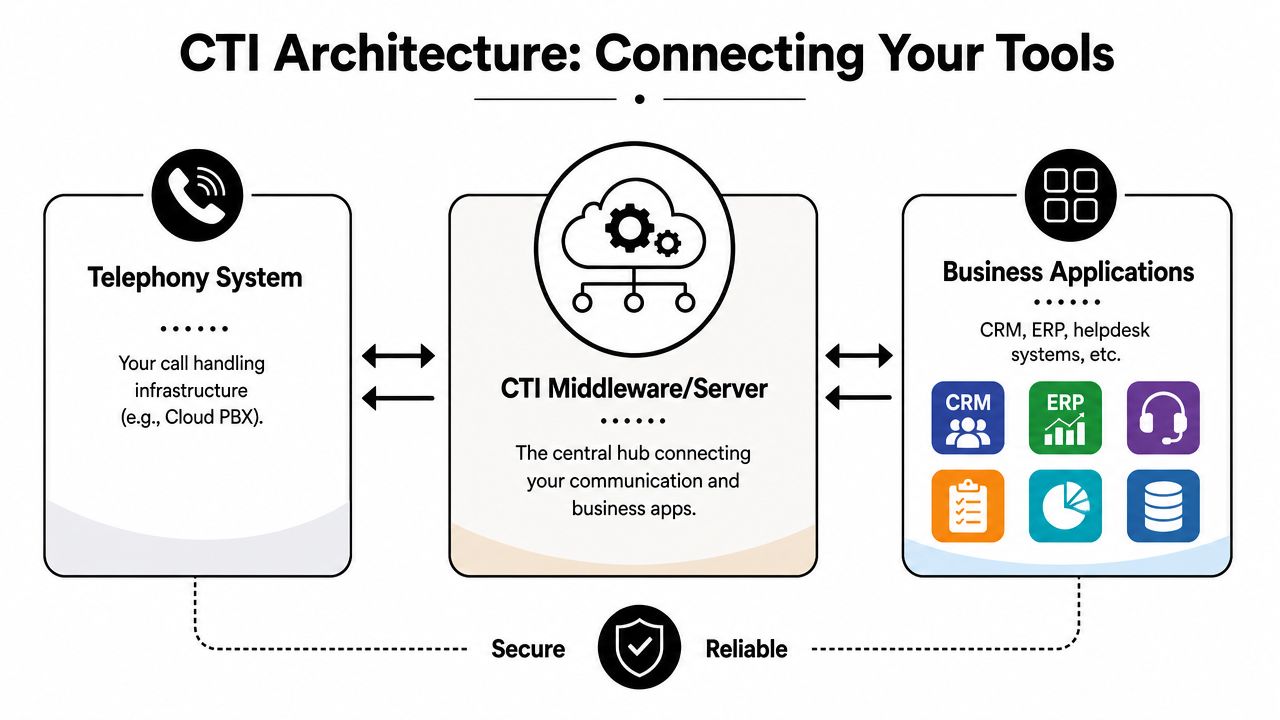
The three pieces that matter
Telephony system
This is your calling infrastructure. In many modern environments, it's a cloud phone service or VoIP platform. It handles inbound and outbound calls, extensions, queues, transfers, voicemail, and related call events.
Business applications
These are the tools your staff already uses. Common examples include a CRM, help desk, scheduling platform, EHR, ERP, or lead management system.
CTI middleware
This is the bridge. It listens for call activity from the phone side and passes relevant information into the business application. It also lets the business application send instructions back, such as click-to-dial or transfer commands.
If you're comparing deployment models, this overview of cloud-based contact center platforms gives a useful starting point for understanding where CTI often lives today.
How the data moves during a live call
Upland explains CTI in practical architecture terms. It's typically built on VoIP plus APIs and middleware, allowing the phone system to pass call events and caller metadata into desktop applications in real time so functions like screen pops and click-to-call can happen, as described in Upland's explanation of CTI.
In plain language, here's the flow:
- A call arrives: The phone platform detects the incoming call.
- Caller data is passed along: The CTI layer receives the phone number and call event.
- A lookup happens: The connected business system checks for a matching customer, patient, or lead.
- The desktop updates: The user sees a pop-up, record, or call control panel.
- Actions stay synchronized: Notes, routing, and outcomes can be recorded in the same workflow.
Why managers should care about architecture
You don't need to write code to understand the business impact. But you do need to know that CTI isn't a single box. It's a chain of connected systems. If one link is weak, users feel it immediately.
A clean architecture leads to smoother call handling. A messy one creates lag, duplicate records, failed pops, and confused handoffs. That's why strong CTI design isn't just an IT concern. It's an operations concern, a service concern, and often a revenue concern too.
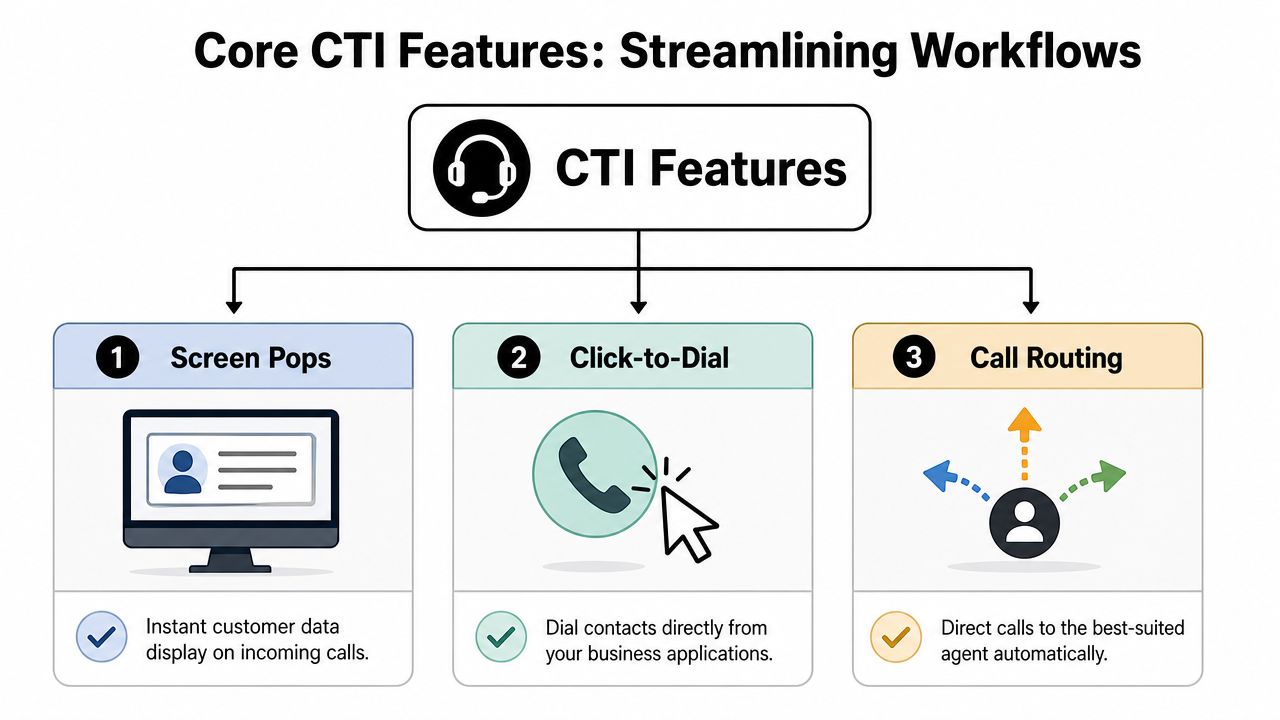
Core CTI Features That Streamline Workflows
Good CTI doesn't just make the phone ring on a computer. It removes small delays that pile up all day.
Productivity boosters your team notices immediately
The most visible feature is the screen pop. Zendesk notes that a key CTI function is synchronizing telephony events and business data so an inbound caller ID can trigger an agent screen pop before the call is answered, which reduces tab switching and manual lookups for faster first-call resolution, as explained in Zendesk's CTI guide.
That one feature changes the opening seconds of a call. Instead of saying, "Can I get your account number?" the employee can start with context.
Other day-to-day improvements are just as useful:
- Click-to-dial: Sales reps call directly from the CRM instead of dialing by hand.
- Automatic call logging: The system records call activity with the contact or account record.
- Desktop call controls: Users answer, hold, transfer, and disconnect from their computer.
- Smarter routing: Calls move to the right person or queue based on rules you define.
A strong CTI setup doesn't save time in one dramatic moment. It saves seconds on nearly every call, and those seconds add up fast.
Here's a simple comparison:
| Workflow moment | Without CTI | With CTI |
|---|---|---|
| Incoming call | Staff asks who is calling, then searches manually | Caller context appears with the call |
| Outbound sales call | Rep reads number and dials manually | Rep clicks the number inside the CRM |
| Transfer to another team | Caller repeats the issue | Call moves with notes or record context |
| Front-desk scheduling | Staff toggles between phone and calendar | Staff can talk and book an appointment in one flow |
A short video can help make those features more concrete.
Where AI voice agents fit into CTI
This is the part many high-level guides skip. Once your phone system and business software are connected, an AI voice agent can do more than greet callers. It can become part of the operating workflow.
For example, an AI layer connected through CTI can:
- Answer common questions: Hours, location, accepted insurance, order status, or service availability.
- Collect caller intent: New patient, existing customer, billing question, lead inquiry, emergency issue.
- Route with context: Pass the call to the right person with notes already attached.
- Handle repetitive front-desk work: Including booking appointments when a calendar or scheduling system is connected.
If you're exploring that model, this overview of an AI receptionist shows how businesses use AI-assisted call handling as part of a broader communications workflow.
The key point is simple. AI voice agents aren't separate from CTI. In a well-designed environment, CTI is what gives the AI access to the information and systems it needs to do useful work, especially around intake and appointment booking.
CTI Benefits for Different Business Teams
CTI isn't just for a traditional call center. Any team that handles phone conversations can use it to cut friction and make outcomes more consistent.

Small and midsize businesses
SMBs often feel the pain first because one missed call can matter more. A plumbing company, legal office, or real estate team may not have a dedicated contact center. The same people answer phones, handle operations, and follow up on sales.
With CTI, those teams can look more organized without adding headcount. Caller information appears faster, follow-up gets logged more reliably, and routine requests don't get lost in sticky notes or inboxes.
A local clinic is a good example. The front desk can answer with context, route urgent matters correctly, and book appointments while staying inside one connected workflow instead of juggling a desk phone and separate scheduling screens.
Sales teams and service desks
Sales teams care about speed and tracking. If a rep can click to call from the CRM, record the interaction automatically, and see recent activity before the conversation starts, they spend more time selling and less time administrating.
Support and service teams care about continuity. When the call record, ticket history, and customer notes live together, callers don't need to repeat themselves as often.
Common gains show up in areas like:
- Lead handling: Faster response to inbound interest.
- Call quality: Better preparation before the first hello.
- Handoffs: Less information lost between departments.
- Follow-up discipline: More complete records after each interaction.
Healthcare, dental, and appointment-driven businesses
These environments get outsized value from CTI because the phone is still central to operations. Patients call to confirm availability, reschedule visits, ask billing questions, and book appointments.
A connected setup helps staff handle those requests with fewer manual steps. It also creates room for automation. An AI voice agent can pick up after hours, answer routine questions, capture patient intent, and route urgent matters appropriately. If the business allows it, the system can also support appointment booking workflows outside normal office hours.
One practical example from the market is Cloud Vision Technologies LLC, which offers a cloud communications platform that combines hosted VoIP, an AI Voice Agent, and contact center software in one environment, including CRM integration and appointment scheduling workflows for businesses that want to replace legacy phone systems.
For appointment-heavy businesses, the value of CTI isn't only faster calls. It's fewer dropped opportunities between "I'd like to come in" and a confirmed booking.
Planning Your CTI Deployment and Integration
A CTI project succeeds or fails before the first user logs in. Most problems don't come from the idea itself. They come from weak planning, bad data mapping, or unrealistic assumptions about reliability.
Start with business workflow, not features
Many teams evaluate CTI by asking which vendor has screen pops or click-to-dial. That's too shallow. Most serious options can do the basics. The better question is how your calls move through the business today.
Consider the workflow:
- Where do calls enter?
- Who answers first?
- What systems need to open during the call?
- When does a call become a task, ticket, lead, or appointment?
- What happens after hours?
If you're replacing a legacy phone system, accurately map the old process. Don't just transfer old habits into newer software. A front office that still relies on handwritten callback notes won't improve much if the new platform merely digitizes the same broken sequence.
Reliability deserves more attention than buyers give it
Vonage highlights an issue many buyers underestimate. CTI performance depends on several connected systems, including the CRM, network, and CTI middleware. When sync delays happen, they can disrupt agent workflow and customer experience, which makes failover planning essential, as discussed in Vonage's article on CTI.
That's an important point. More integration can create more failure points.
Ask practical questions such as:
- If the CRM is slow, what does the agent still see?
- If the screen pop fails, can the call still be answered normally?
- If internet quality drops, how are calls rerouted?
- If the AI layer can't complete a task, how does it hand off to a person?
- If appointment booking integration is unavailable, what fallback script should staff use?
Reliability planning isn't pessimism. It's part of the design.
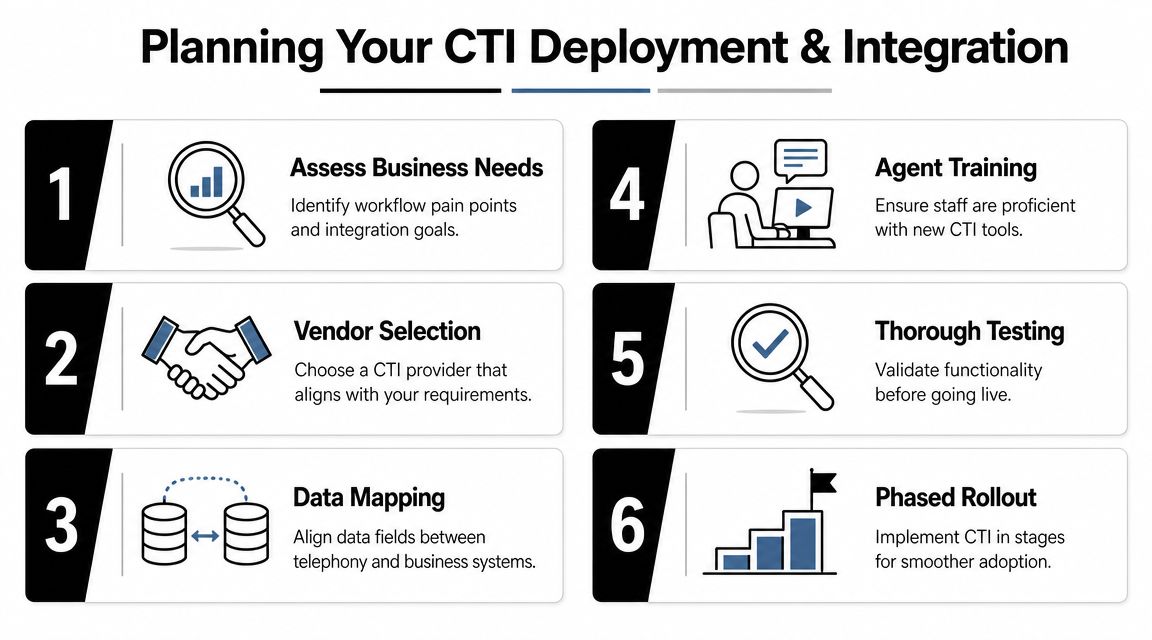
A realistic rollout checklist
A phased approach usually works better than a big-bang migration. Here's a practical checklist:
- Assess pain points first: Identify where hold time, misrouting, duplicate entry, and missed appointment booking happen now.
- Clean customer data: CTI can only match records well if names, phone numbers, and account data are reasonably consistent.
- Map fields carefully: Decide what should pass between telephony, CRM, help desk, and scheduling tools.
- Pilot with one team: Start with a group that handles a clear workflow, such as inbound support or front-desk scheduling.
- Train for edge cases: Teach users what to do when a pop doesn't appear, a transfer fails, or a caller needs urgent escalation.
- Review after-hours logic: This is especially important if you want AI or automation to support appointment booking outside business hours.
Security and compliance also belong in planning, not as an afterthought. Healthcare, legal, and financial organizations need to verify how call data, recordings, logs, and user permissions are handled before launch.
Evaluating CTI Software and Measuring ROI
A CTI buying decision gets easier when you score vendors against the workflows you run. Features matter, but fit matters more. A platform that's perfect for a large support center may be awkward for a clinic that mostly needs reliable routing and appointment booking.
A buyer's checklist you can actually use
Use this scorecard when comparing options:
| Evaluation Criteria | Question to Ask | Importance (1-5) |
|---|---|---|
| CRM compatibility | Does it integrate with the CRM or business software we already use without heavy custom work? | 5 |
| Call control workflow | Can staff answer, transfer, hold, and log calls from the same screen they already work in? | 5 |
| Routing flexibility | Can we route by department, skill, schedule, or caller type? | 4 |
| Appointment workflow support | Can the system support scheduling or appointment booking processes cleanly? | 5 |
| AI and automation | Does it support an AI voice agent, after-hours handling, and intelligent handoff to staff? | 4 |
| Reliability planning | What happens if the CRM is slow, the network drops, or the CTI sync fails? | 5 |
| Reporting visibility | Can managers review call activity, outcomes, and workflow bottlenecks easily? | 4 |
| Security and compliance | Does the system align with our industry requirements for access, recordings, and data handling? | 5 |
| Deployment model | Is cloud, hybrid, or on-premise the right operational fit for our business? | 4 |
| Support and onboarding | Who helps us configure integrations, test routing, and train users? | 4 |
If you want to turn those criteria into a business case, an ROI calculator for communications investments can help frame the discussion internally.
What to measure after go-live
Don't try to prove ROI with vague impressions. Track operational changes that your managers already understand.
Start with a small set of metrics:
- Average handle time: Are agents spending less time searching and documenting?
- First-call resolution: Are more issues getting handled without repeat contact?
- Outbound activity: Are sales reps making more calls because click-to-dial reduces friction?
- Appointment conversion: Are more inbound callers completing the scheduling process, including after-hours appointment booking if AI is involved?
The best sign that CTI is working isn't a flashy dashboard. It's when calls move with less friction, staff stay in one workflow, and customers reach the right outcome faster.
Cloud Vision Technologies LLC offers one option for businesses moving off legacy phone systems and into an integrated cloud communications model. If you're evaluating CTI, hosted VoIP, contact center tools, or AI-assisted appointment booking, you can review their platform and service approach at Cloud Vision Technologies LLC.