If you're asking what is CCaaS, you're probably already feeling the problem it solves.
A customer calls while your front desk is busy. Another sends a text. Someone fills out a website form asking to book an appointment after hours. Your team answers one channel well, misses another, and by morning that potential customer has moved on. Nothing is technically “broken,” but the experience is fragmented, and fragmented service costs real opportunities.
For many small and mid-sized businesses, that's the tipping point. The issue isn't just phone service. It's that customer communication has outgrown a patchwork of desk phones, inboxes, mobile numbers, and manual workarounds.
From Missed Calls to Seamless Connections
A customer calls at 6:10 p.m. to book an appointment. Your front desk has gone home. The call goes to voicemail, the customer never leaves a message, and by the next morning they have booked with a competitor. That is the kind of everyday revenue leak CCaaS is built to fix.
CCaaS stands for Contact Center as a Service. It is a cloud-based way to run customer communications, with the provider delivering the software, infrastructure, and updates as a subscription service, as described in NICE's overview of CCaaS.
For a business owner, the simpler explanation is this. CCaaS takes the job once handled by phone hardware, separate inboxes, and manual message-taking, then puts it into one connected system your team can access through a browser or app. Calls, texts, chat messages, emails, and other customer conversations stop living in separate places.
That distinction is important because a request to reschedule Tuesday at noon should not sit in the same blind queue as an urgent call, and neither should disappear after hours.
What that looks like in plain English
CCaaS works like switching from a back office full of equipment to a service that is always available when your team logs in. Your staff can answer calls from a laptop, see recent conversation history, transfer inquiries to the right person, and review what happened across channels without stitching the story together by hand.
For a growing company, that change is often the first real step away from a legacy phone setup. You stop asking, "Which device got the message?" and start asking, "How should we handle this customer?" If you want a practical example of what that transition looks like, a cloud contact center platform shows how voice, messaging, routing, and reporting can live in one place.
Practical rule: If customers can reach you in several ways, your team needs one record of the conversation.
Why business owners care
The value shows up in operations first.
A modern CCaaS platform helps you catch inquiries that used to fall through the cracks. It reduces the back-and-forth when a customer calls, then texts, then emails and expects your team to know the context. It also gives you a practical way to automate routine work, especially after hours.
Integrated AI agents generate immediate return. Instead of treating AI as a flashy add-on, a business can use it for specific jobs that consume staff time every day: booking appointments, answering common questions, confirming availability, collecting intake details, or routing urgent issues to the right person. If your office is closed at night, an AI agent can still turn a missed call into a scheduled appointment.
That makes CCaaS less about buying a new phone system and more about removing friction from the customer journey. A dental practice can book more after-hours visits. A law firm can route urgent matters correctly. A real estate team can turn inbound inquiries into scheduled showings instead of a full voicemail box.
Understanding the CCaaS Architecture
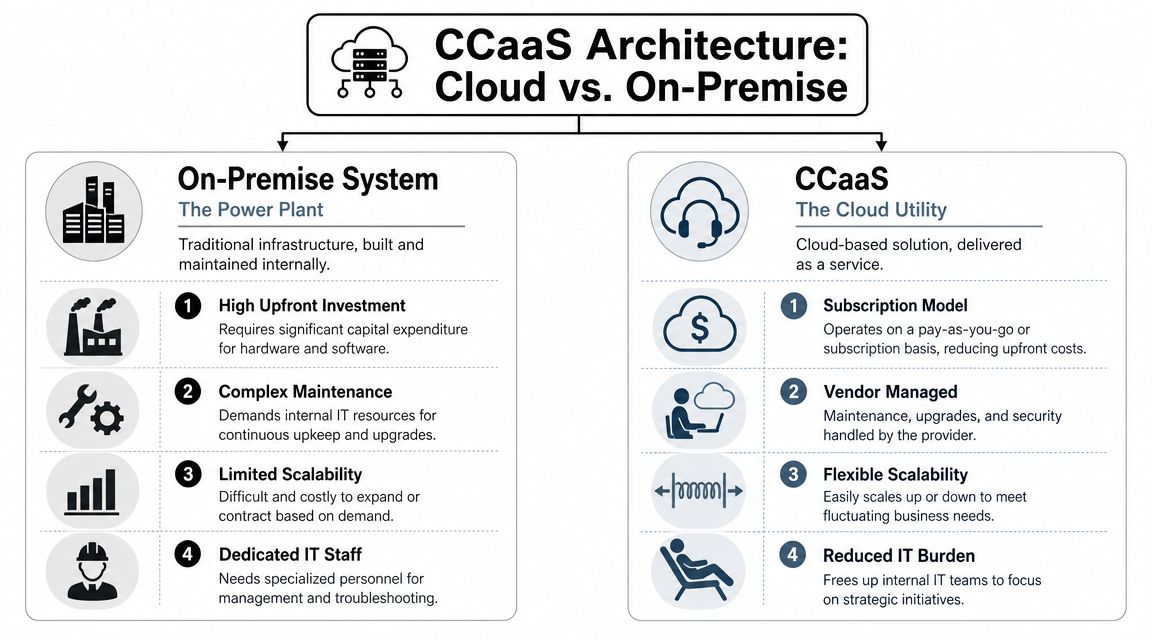
The easiest way to understand CCaaS is to compare it with power.
An on-premise setup is like building your own power plant behind the office. You buy the equipment, maintain it, troubleshoot it, and expand it when demand grows. CCaaS is like plugging into the electrical grid. You still use the power, but a specialist handles the heavy infrastructure behind the scenes.
The three parts that matter
At a business level, CCaaS usually makes sense when you break it into three simple pieces.
The cloud platform. This is the engine. The provider hosts the software, routing logic, reporting, and automation tools. Your business subscribes to the service rather than installing and maintaining the stack in your own office.
The team workspace. Agents, receptionists, schedulers, and managers sign in through an app or browser. They can answer calls, reply to messages, transfer conversations, check customer history, and monitor queues from almost anywhere.
The customer channels. Your customers still call, text, email, or chat the way they prefer. The difference is that those interactions feed into one system instead of landing in disconnected tools.
Why this model feels easier to run
The primary shift is ownership versus access.
With on-premise systems, your team owns the burden. When something needs updating, testing, or expanding, it often becomes your problem. With CCaaS, the provider manages the platform, and your team focuses on serving customers.
That's one reason many businesses start their search by reviewing a cloud contact center platform instead of shopping for hardware.
You don't buy a modern contact center the way you buy office furniture. You subscribe to an operating system for customer conversations.
A simple example
Take a clinic that wants to handle calls, texts, and appointment booking in one place.
With a legacy setup, the phone rings at the front desk, texts might go to a separate number, and after-hours requests sit untouched until morning. With CCaaS, those channels can route through the same platform. Staff sees the interaction history in one place, and AI can step in for routine booking requests when the office is closed.
That's the architecture in practical terms. One service. Multiple channels. Less infrastructure stress.
Core Features That Transform Customer Service
Feature lists can get abstract fast, so it helps to translate each one into a business problem.
Most companies don't buy CCaaS because they want “more features.” They buy it because they want fewer missed opportunities, fewer handoff errors, and a better way to handle routine tasks like booking appointments without burning out their staff.
Omnichannel routing
Customers rarely stick to one channel anymore. They may call first, then text, then reply to an email.
Omnichannel routing brings those paths together so the system can direct the conversation based on rules, availability, and context. The business benefit is simple. Customers stop starting over every time they switch channels.
For a service business, that means someone who asks about pricing by text and later calls to book an appointment doesn't sound like a stranger to your team.
Interactive voice response
IVR is the menu system callers hear when they call in. Done badly, it frustrates people. Done well, it acts like a traffic director.
A smart IVR helps callers reach the right destination quickly. It can separate urgent issues from routine ones, route existing customers differently from new leads, or send scheduling calls to the booking workflow. That matters because a call about an urgent matter shouldn't sit behind a basic request to reschedule Tuesday at noon.
AI voice agents
For many businesses, immediate practical value becomes apparent.
An AI voice agent can answer inbound calls, respond to common questions, collect details, and handle structured tasks such as booking appointments around the clock. For healthcare practices, home services companies, salons, or legal offices, that changes what happens after hours. Instead of voicemail, the caller gets help.
One option businesses review for this use case is an AI receptionist for appointment handling and call automation.
If your best lead calls after closing time, voicemail isn't a neutral outcome. It's a leak in your sales process.
Analytics dashboards
Managers need more than a ringing phone and a hunch.
A CCaaS dashboard can show queue activity, agent availability, missed interactions, and conversation trends in real time. That helps supervisors spot recurring friction, such as calls piling up at lunch or too many handoffs for simple requests.
For a growing business, analytics turn customer service from a reactive function into something you can manage deliberately.
Dialers and outbound tools
Not every contact center interaction is inbound.
Outbound teams often need tools to call prospects, follow up on requests, confirm visits, or remind customers about upcoming services. Dialers help teams move through those tasks with less manual work and more consistency.
That's useful in sales environments, but it also matters for operations. A clinic might confirm appointments. A property team might follow up with leads. A service company might call customers back when a technician is on the way.
The bigger pattern
These features work best together.
AI handles routine intake and appointment booking. IVR directs traffic. Omnichannel routing keeps the conversation connected. Dashboards show where service is slipping. Dialers support follow-up. The result is a contact operation that feels less like improvisation and more like a system.
The Business Case for CCaaS Benefits and ROI
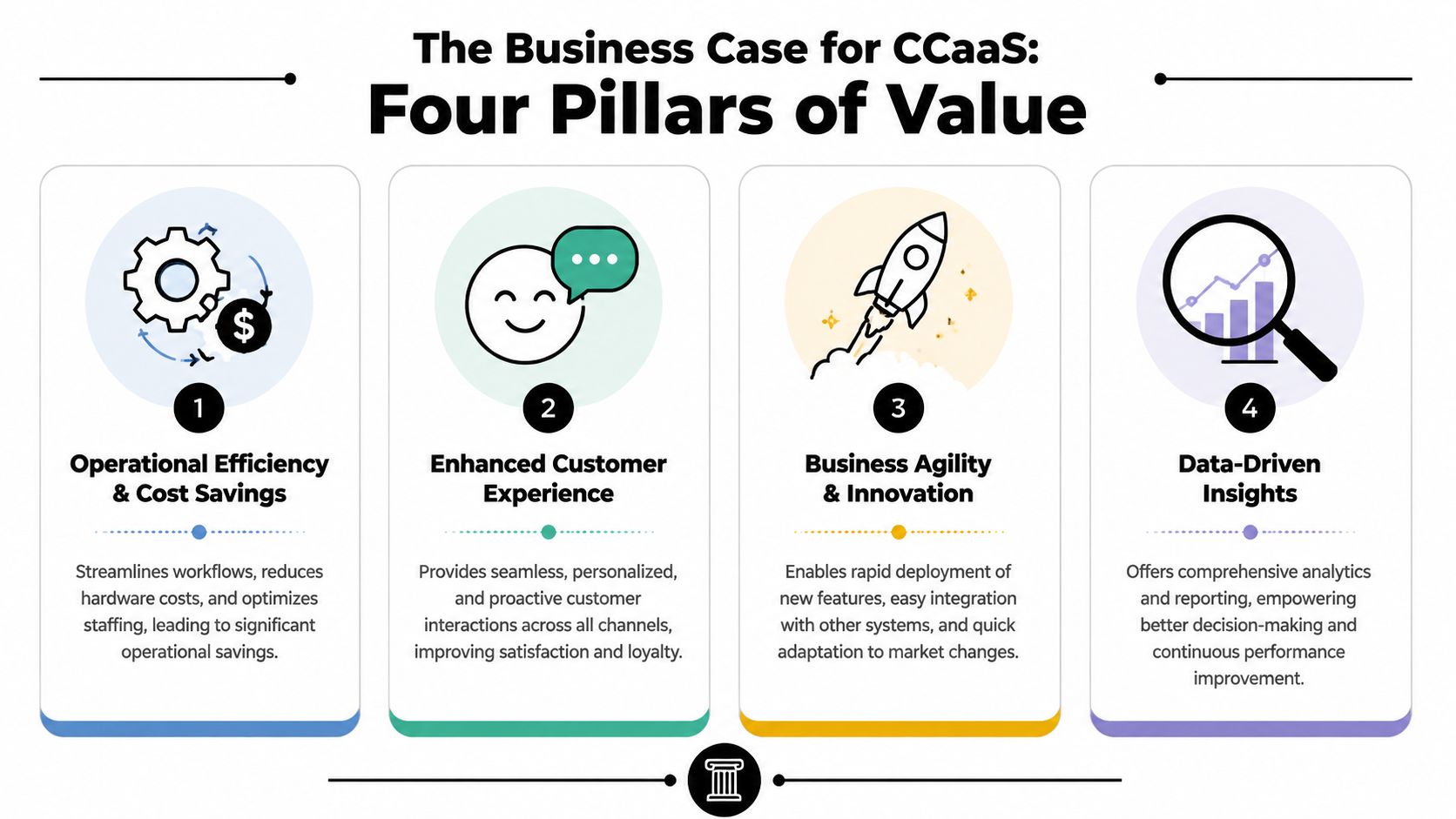
CCaaS becomes easier to justify when you stop viewing it as a software expense and start viewing it as an operating model.
The return doesn't come from having a shinier phone tree. It comes from reducing friction in the places where friction costs money, staff time, and customer trust.
Cost becomes more predictable
On-premise systems often create chunky, hard-to-time expenses because equipment, maintenance, and upgrades tend to arrive as projects.
CCaaS shifts the model toward subscription-based operations. That doesn't mean communication becomes free. It means the business usually gets a clearer cost structure and avoids owning physical contact center infrastructure.
For owners trying to plan growth, predictable spend is often easier to manage than surprise hardware decisions.
A useful starting point is a contact center ROI calculator that helps frame the cost of missed calls, manual work, and inconsistent coverage.
Productivity improves when routine work gets automated
Staff time is expensive even when you don't measure it line by line.
If employees spend the day answering the same basic questions, transferring callers repeatedly, or manually capturing details for appointment booking, they have less time for the interactions that require judgment. Automation shifts that workload. AI and routing tools take the repetitive layer off the team.
This short video offers a visual look at how that business case comes together.
Customer experience stops being dependent on who happens to answer
Customers rarely describe their experience in technical terms.
They notice whether they reached someone quickly, whether they had to repeat themselves, and whether the business helped them complete a task like changing or booking an appointment without friction. CCaaS supports that by organizing interactions across channels and applying routing and automation consistently.
A smoother customer journey isn't just a service win. It protects revenue that would otherwise slip away through delay and confusion.
The business gets more adaptable
Markets change. Staffing changes. Customer expectations change.
A modern cloud contact platform makes it easier to support remote work, add channels, refine workflows, and adopt tools like AI without rebuilding the entire communication stack. That flexibility matters because today's workaround often becomes tomorrow's bottleneck.
The practical ROI is simple. Fewer dropped inquiries. Better use of staff time. More consistent service. A cleaner path to growth.
CCaaS vs On-Premise vs UCaaS
These terms get mixed together all the time, and that confusion leads to bad buying decisions.
On-premise means the business hosts and manages the communication infrastructure itself. UCaaS usually focuses on internal communication, such as calling, messaging, meetings, and collaboration for employees. CCaaS focuses on customer-facing interactions, including routing, queues, automation, analytics, and service workflows.
If your main problem is that staff need better internal communication, UCaaS may be the right lens. If your main problem is that customers can't reach the right person, or your team struggles to manage inquiries and appointment booking across channels, CCaaS is the more direct answer.
Comparison of communication platforms
| Aspect | On-Premise | UCaaS | CCaaS |
|---|---|---|---|
| Primary role | Business-owned communication infrastructure | Internal team communication and collaboration | Customer communication and service operations |
| Deployment model | Installed and managed locally by the business | Cloud-based service | Cloud-based service |
| Main users | Internal IT and phone users | Employees and managers | Agents, supervisors, sales and support teams |
| Customer channel handling | Often limited or fragmented unless heavily customized | Usually secondary to internal communication | Central focus across voice, chat, email, SMS, and other service channels |
| Scalability | Expansion can require more planning, equipment, and support | Easier to add users and locations | Easier to add agents, workflows, and service capacity |
| Best fit | Organizations that want direct infrastructure control | Businesses improving employee collaboration | Businesses improving customer experience and response handling |
| Appointment workflows | Often manual or dependent on separate tools | Possible, but not usually the core design | Commonly supported through routing, automation, and AI for booking appointments |
What most SMBs actually need
Some businesses need both UCaaS and CCaaS. A law firm may want employee messaging and calling for internal work, plus customer-facing call routing and intake. A dental practice may want a cloud phone system for staff and an AI layer for after-hours appointment booking.
The key is to buy for the main job. Don't choose a team collaboration tool and expect it to behave like a customer service engine. And don't keep an aging on-premise setup just because it still turns on.
A quick decision shortcut
Use this simple filter:
- Choose on-premise if your organization has a strong reason to own and manage the infrastructure directly.
- Choose UCaaS if internal communication is the bigger pain point.
- Choose CCaaS if customer contact, routing, response handling, and automation are where the business is straining.
That distinction clears up most of the acronym fog.
Implementation and Vendor Selection Checklist
The hardest part of a CCaaS project usually is not buying software. It is deciding how customer conversations should flow once the system is live.
A business can move from an aging phone setup to a cloud contact center and still keep the same bottlenecks if the rollout is rushed. Calls still land in the wrong place. After-hours inquiries still wait until morning. Staff still spend time doing repetitive intake by hand. The better approach is to map the actual customer journey first, then configure the platform around it. That is where features like AI agents start producing immediate return, especially for routine work such as booking appointments while your team is unavailable.
Implementation roadmap
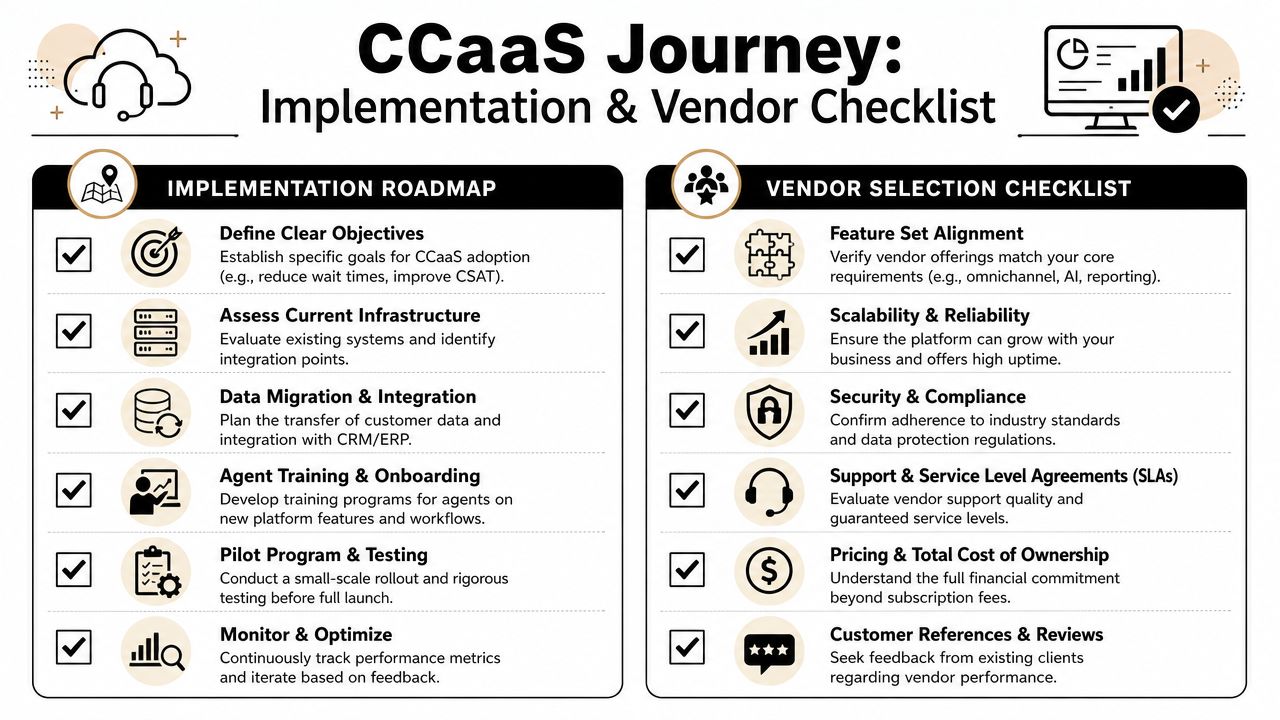
Use this as an internal working checklist before you sign anything.
- Map your incoming demand: List every way customers reach you now. Calls, texts, forms, email, web chat, social messages. If appointment booking happens in more than one place, document each path.
- Define routing logic: Decide what should happen to new leads, existing customers, urgent issues, billing questions, and scheduling requests.
- Identify handoff moments: Mark where automation should pass the conversation to a person. This matters for sensitive situations, exceptions, and requests that fall outside policy.
- Clean up your scripts and FAQs: AI works better when common questions, booking rules, office hours, and escalation paths are written clearly and kept current.
- Train by scenario, not by button: Staff need practice with real situations, such as rescheduling, missed-call follow-up, and after-hours inquiries.
One simple test helps. Call your own business after hours and try to book an appointment as if you were a new customer. If the experience feels confusing to you, it will feel confusing to customers too.
Vendor selection questions
A vendor demo can make every platform look polished. The true test is whether the provider can support your day-to-day operation without forcing your team into workarounds.
Ask direct questions.
- How do you support appointment workflows? Ask whether the platform can handle booking appointments, confirmations, rescheduling, and live handoff when a request falls outside standard rules.
- What channels are native to the platform? Get clear answers on voice, SMS, email, chat, and any other channel your business already uses.
- How does reporting work for managers? Ask what supervisors can see in real time and what historical reporting is available.
- What integrations are available? CRM and scheduling connections matter because disconnected systems create duplicate work and inconsistent records.
- How are security and compliance handled? This matters more for healthcare, legal, and financial organizations.
- What support do we get during rollout and after launch? Early implementation help matters, but long-term support usually matters more.
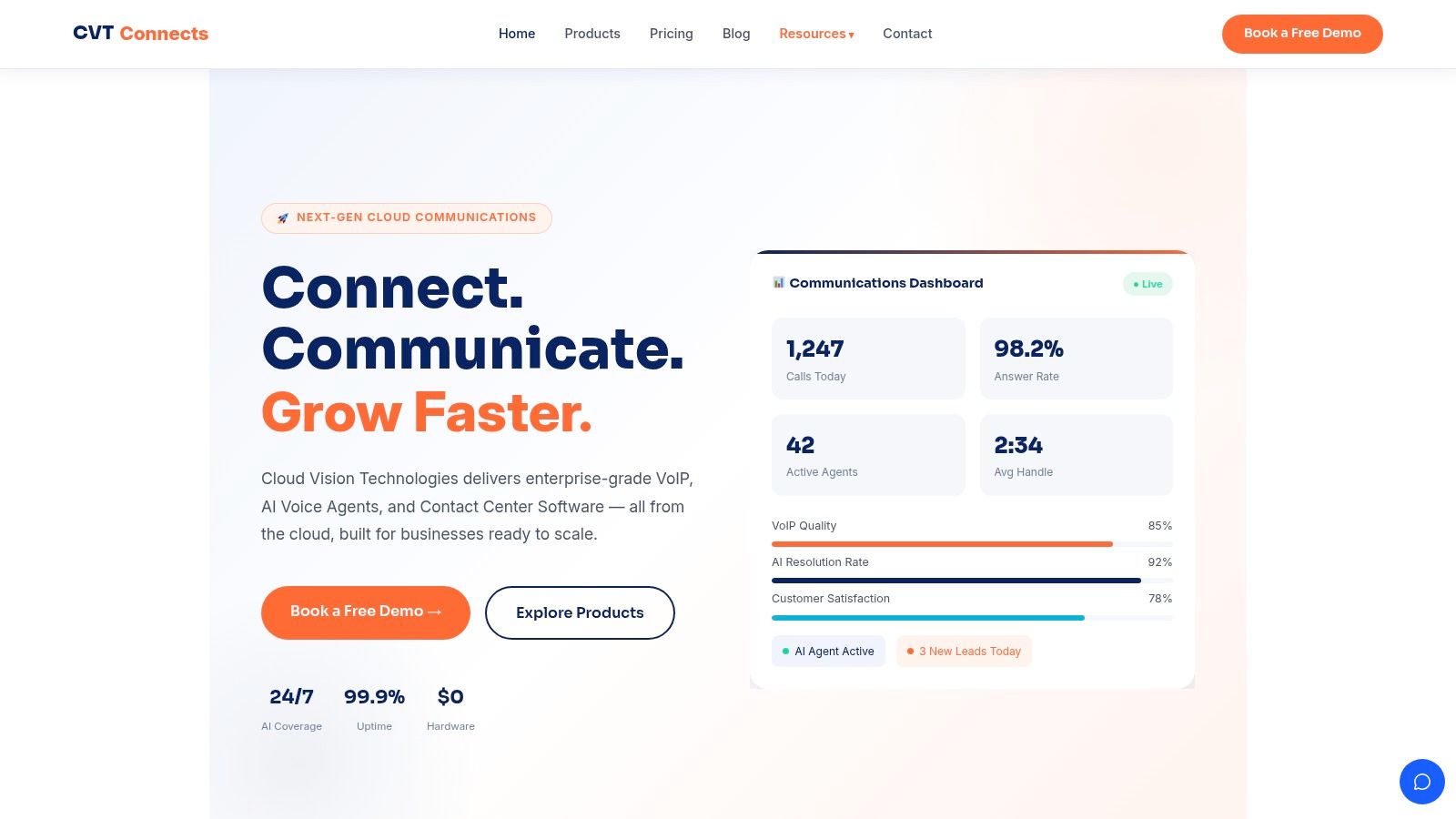
As an example of a provider that addresses these points, businesses may evaluate Cloud Vision Technologies LLC, which offers cloud contact center software, Hosted VoIP, and an AI voice agent that can schedule appointments and transfer calls to live staff when needed.
Your Next Steps to a Modern Contact Center
By this point, the answer to what is CCaaS should feel less abstract.
It isn't just a cloud version of an old phone room. It's a practical way to bring customer conversations into one managed system so your team can respond faster, route smarter, and automate routine work such as booking appointments even when nobody is sitting at the front desk.
For many businesses, a key shift is operational. You move from disconnected tools and missed opportunities to a model where calls, texts, emails, and workflows work together. Customers get a smoother path. Staff get a cleaner process. Managers get visibility instead of guesswork.
That matters whether you're running a healthcare practice, a legal office, a property team, a retail operation, or a service business with uneven call volume. The technology only matters because of what it fixes. Lost after-hours inquiries. Repetitive manual intake. Poor routing. Delayed follow-up. Inconsistent customer experience.
If you're evaluating your current setup, start with a few practical questions. Where are conversations getting dropped? Which routine requests consume the most staff time? How often does someone try to book an appointment when your team is unavailable? Those answers usually make the need clear.
CCaaS isn't just a communications purchase. It's a decision about how your business shows up when customers reach out.
If you're exploring a modern contact center, Cloud Vision Technologies LLC is one option to review for cloud calling, contact center workflows, and AI voice automation that can help teams handle customer inquiries and booking appointments without on-premise hardware.