A customer calls to confirm pricing, asks whether your team can handle a rush job, and wants to book an appointment before the week ends. Your employee says yes, takes notes on paper, and moves to the next call. Two days later, nobody can find the note, the customer says they were promised something different, and the appointment was never booked.
That's the moment many owners start looking seriously at phone call recording.
Used well, recording isn't about spying on staff or collecting audio for its own sake. It's about protecting revenue, preserving context, tightening service quality, and giving your team a reliable record of what was said. In a busy office, memory is fragile. Audio is evidence.
The bigger shift is what happens after the call. A recorded conversation can support coaching, resolve disputes, document consent, feed call analytics, and power AI workflows like transcription, summaries, and automated appointment booking. That full lifecycle matters more than the record button itself.
Why Businesses Are Recording Phone Calls
A lot of businesses adopt phone call recording after something goes wrong. A manager reviews a complaint and realizes nobody can verify what the agent said. A sales team loses a deal because a follow-up detail was missed. A healthcare or dental office learns that the patient intended to book an appointment, but the front desk never logged it.

Recording solves a simple business problem first. It captures conversations exactly as they happened. That alone helps with quality assurance, staff training, dispute resolution, and compliance review. It also gives managers something more useful than secondhand summaries.
Recording started as storage and became operations
Phone call recording feels like a modern software feature, but the roots go much further back. A patent for a “Telephone Answering Machine” was filed in 1903, cited as the first patent on record addressing communication recording, and early systems moved from wax cylinders to physical tape before digital platforms took over, as described in this history of call recording technology.
That history matters because it explains the mindset many businesses still carry. They treat recordings like archived files. Keep them somewhere, pull them only when there's a problem, and otherwise ignore them.
That approach leaves value on the table.
Practical rule: A recorded call is most useful when it becomes part of a workflow, not a forgotten audio folder.
Why owners keep the feature once they turn it on
The businesses that stick with recording usually discover four practical wins:
- Service consistency: Managers can hear exactly how staff handle objections, transfers, and difficult callers.
- Better follow-through: Teams can revisit details that matter to quotes, callbacks, and appointment booking.
- Cleaner accountability: When a dispute appears, the business has an objective record.
- More useful automation: Once audio is captured, software can transcribe it, summarize it, and route next steps faster.
That last point is where the category has changed. Recording used to mean “save the call.” Now it often means “capture the call so the business can act on it.”
Understanding How Phone Call Recording Works
Most owners don't need a telecom engineering lesson. They need to know whether the system is reliable, whether it fits their phone setup, and whether it creates extra hardware headaches.
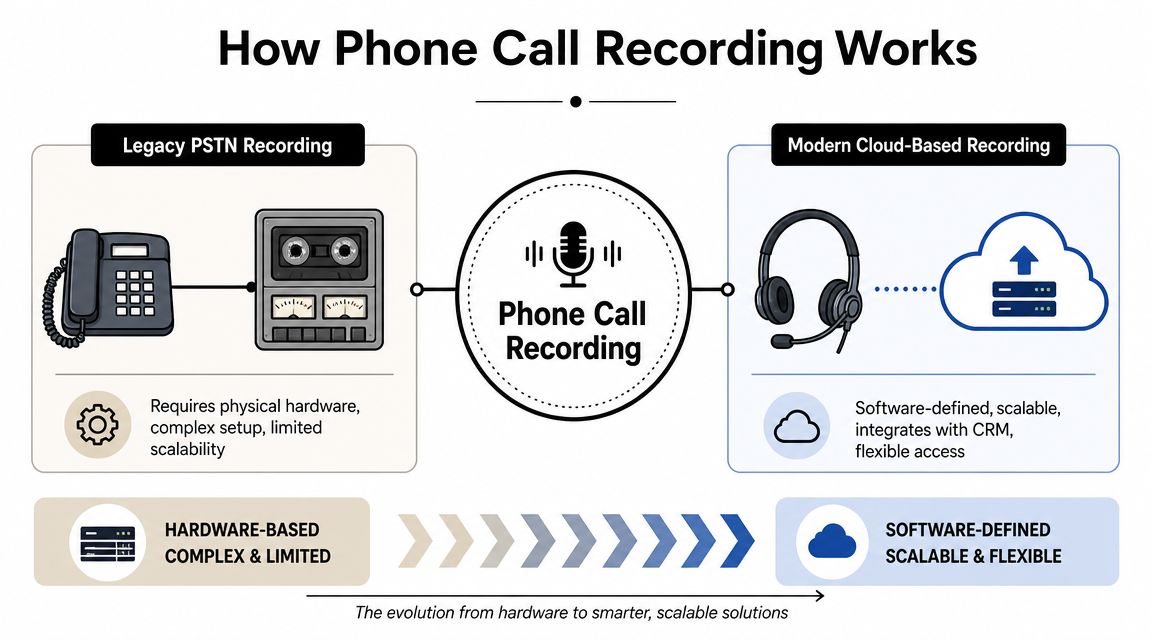
The simplest way to think about modern phone call recording is this: it works like a digital photocopier for conversations. The phone platform duplicates the call audio while the conversation is happening, then stores that copy as a file your team can retrieve later.
Legacy setups relied on physical capture
Older phone environments often depended on the physical phone line. If a company wanted dependable recording, it typically needed specialized hardware attached to the telephony setup. That made deployment more cumbersome and expansion more expensive in practice.
Those systems could work, but they were rarely flexible. They also made remote work, multi-site teams, and simple retrieval more difficult than they needed to be.
Modern systems record at the telephony layer
Current business platforms usually handle recording in software. Modern business call recording is commonly implemented by intercepting and duplicating SIP audio streams in real time, which lets the system capture both inbound and outbound media without a separate hardware tap, then store the audio as a digital file for retrieval, evaluation, and compliance workflows, as explained in this overview of SIP-based business call recording.
That design changes the buying decision in important ways.
| Approach | How it typically works | What it means for the business |
|---|---|---|
| Hardware-oriented recording | Audio is captured through physical telephony components | More setup complexity, less flexibility |
| Cloud or VoIP recording | Audio is duplicated in software during the call | Easier access, simpler scaling, cleaner integrations |
What to ask a provider in plain language
If you're evaluating phone call recording, ask these questions:
- Where is recording triggered. At the handset, app, carrier, or cloud phone platform?
- What gets captured. Inbound only, outbound only, or both?
- How do users retrieve calls. Through a portal, CRM, queue view, or manual export?
- Can recordings connect to workflows. For example, follow-up tasks, QA review, or booking appointment requests.
- Who controls retention. Because storage without policy becomes a mess quickly.
If a vendor can't explain recording clearly in business terms, support will probably be frustrating later too.
Navigating Phone Call Recording Laws and Consent
Phone call recording becomes risky when a business assumes one policy fits every caller. That's rarely true once your team serves people across states or countries.
The legal issue most owners hear first is one-party consent versus all-party consent. That distinction matters, but by itself it isn't enough for daily operations. A greater challenge is mixed-jurisdiction calling, where your staff may speak with customers across the U.S., Canada, the U.K., Germany, and the EU during the same workday.
The safe operating mindset
HubSpot notes that about 13 U.S. states require all-party consent, that Canada requires informed consent from all parties, and that Germany treats unauthorized recording as a criminal offense under Section 201 in this practical guide to call recording laws. For most businesses, that means the strictest plausible rule should shape the workflow.
A small team can't expect every employee to make legal judgments on the fly. The process needs to do the work.
Tell people clearly before recording starts. Then document that the notice happened.
A practical consent table for U.S. operations
Because state treatment varies, the cleanest operating distinction is this:
| Consent Type | States |
|---|---|
| All-party consent | Some U.S. states require consent from all parties. HubSpot notes that about 13 states fall into this category. |
| One-party consent | Other states generally allow recording with one-party consent, but interstate calls still create risk if another jurisdiction applies. |
That table is intentionally simple because oversimplified state-by-state lists can become outdated, and edge cases matter. If your team handles calls across state lines, internal policy should assume that a stricter standard may apply.
What works in real operations
The best compliance workflows are boring on purpose. They remove guesswork.
A strong baseline process usually includes:
- Automated pre-call notice: An announcement such as “This call may be recorded” before the live conversation begins.
- Agent reinforcement: If needed, the employee repeats the notice at the start of the conversation.
- Recorded confirmation: In higher-risk workflows, the caller's continued participation or express acknowledgment is preserved in the file.
- Policy by call type: Sales, support, intake, and appointment booking may need different scripts.
- Escalation rules: If a caller refuses recording, staff need a defined alternative.
Mixed-jurisdiction calls need special handling
Many teams fail. They build a domestic script and forget that remote staff, cross-border clients, and distributed call routing can put multiple legal regimes into one conversation.
If your business serves multiple regions, set policy around these questions:
- Where is the caller located
- Where is the employee located
- Which team owns the script
- Whether transcription is enabled
- Whether the call involves sensitive information
- How appointment booking details are stored after the call
Legal counsel should review your specific use case. That isn't a disclaimer to avoid giving guidance. It's the practical limit of any public article. Your operation needs a repeatable consent method that staff can follow every time.
Business Benefits You Can Unlock with Recordings
Once consent and system design are handled, the value of phone call recording becomes easy to see. The strongest programs treat recordings as operating material. Not just evidence for rare disputes, but a working asset used by managers, trainers, service teams, and schedulers.
Coaching gets specific fast
A supervisor can tell an agent to “sound more confident,” but that feedback is vague. A recorded call lets the supervisor point to the exact moment the rep interrupted the caller, missed a buying signal, or failed to confirm an appointment time.
That changes coaching from opinion to evidence. It also reduces defensiveness because both people are hearing the same interaction.
Training new employees becomes grounded
New hires learn faster when they can hear real calls instead of relying only on scripts. A short library of strong conversations helps them understand pacing, objection handling, handoffs, and intake questions.
This is especially useful in businesses where appointment booking matters. A trainee can hear how a seasoned employee confirms the service need, checks availability, and closes with a clear booking commitment instead of ending the call with “we'll get back to you.”
Strong call libraries become your unofficial playbook long before anyone writes a perfect SOP.
Recordings help settle disputes and protect the business
When a customer says, “Your team told me something else,” a recording can clarify what happened. Sometimes it protects the company. Sometimes it shows the company made the mistake. Both outcomes are useful because ambiguity is expensive.
Recordings also reduce internal confusion. Managers can review exactly how a complaint developed instead of piecing together partial accounts from different employees.
Call data improves staffing and follow-up
The recording itself matters, but the metadata around it matters too. Modern call logs commonly store the date and time, caller number, call duration, whether the call was answered, missed, or sent to voicemail, and sometimes queue time, agent name, and the recording itself. That broader call-history data helps teams reduce missed calls, improve callback speed, staff for peak windows, and refine routing, as outlined in this guide to using call history data for service quality.
That's where owners often find the hidden return. They start by wanting proof of conversations. They end up improving missed-call recovery, queue coverage, and response discipline.
If you want to frame that value financially, a simple planning tool like this communications ROI calculator can help you map operational waste against better call handling.
Beyond Recording From Audio to AI-Powered Insights
Recording is the capture layer. Significant value emerges when software turns that audio into something searchable, sortable, and actionable.
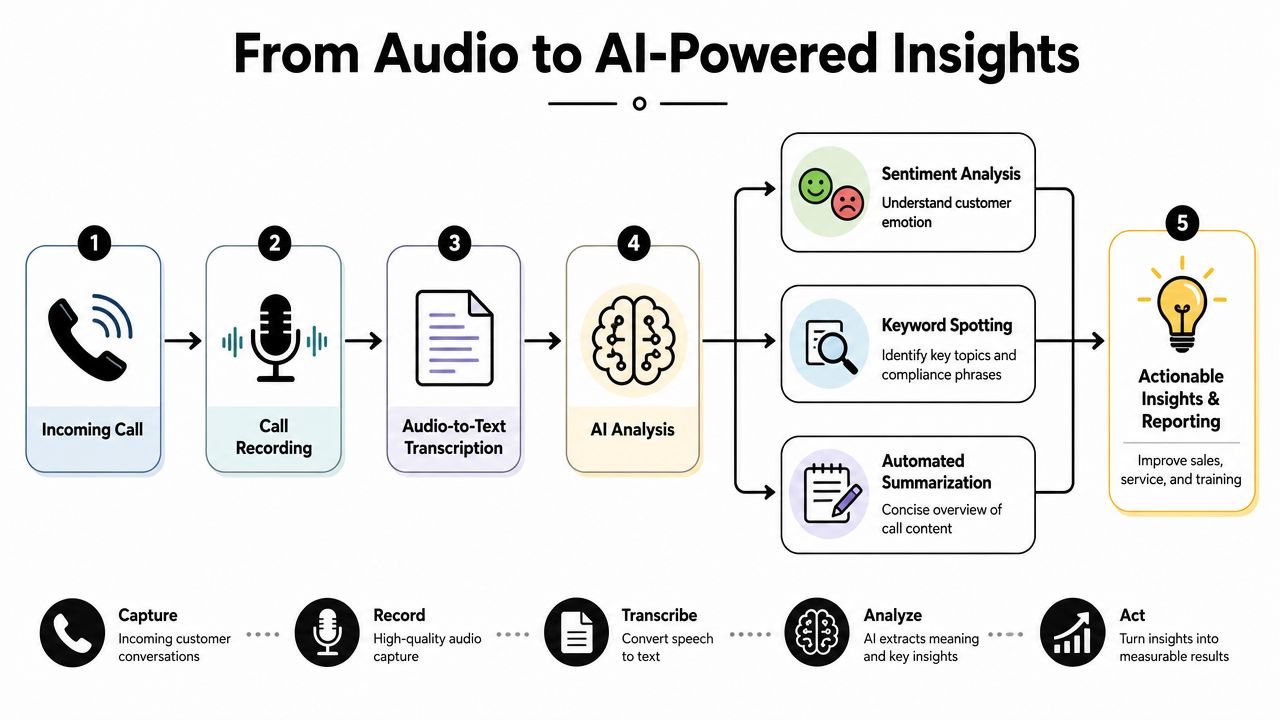
A basic recording forces someone to listen back manually. An AI-enriched record can produce a transcript, a short summary, topic cues, and follow-up context. That matters when teams are moving quickly and can't replay every call.
What AI adds after the call
Existing guidance increasingly points to a shift from simple recording toward AI-enriched records that generate transcripts and summaries, while also raising new questions around secure storage, least-privilege access, and privacy exposure for those text artifacts, as noted in this discussion of modern call recording software and AI features.
That creates a practical split in your policy:
- Audio retention may serve QA, legal review, or dispute handling.
- Transcript access may need tighter role controls because text is easier to search, copy, and circulate.
- Summaries can speed follow-up, but they shouldn't become a substitute for careful review in sensitive situations.
A useful example is front-desk automation. An AI voice system can answer common questions, collect caller intent, and handle booking appointment requests before a live employee joins. If that interaction is recorded and transcribed, the human who takes over already has context.
For teams exploring that model, an AI receptionist workflow shows how intake, routing, and appointment booking can be tied together.
Here's a short walkthrough of the broader idea:
A practical workflow for appointment-driven businesses
In healthcare, dental, legal intake, home services, and real estate, the call often ends in one of three outcomes: book an appointment, request a callback, or drop off.
AI-enhanced recording helps by preserving the full path:
- The caller explains the need
- The system records the interaction
- Speech becomes searchable text
- A summary captures next steps
- Staff can confirm appointment booking without restarting discovery
That's more than convenience. It reduces handoff friction. Customers don't want to repeat themselves, and staff shouldn't need to reconstruct basic facts from memory.
How to Choose Your Phone Call Recording Solution
The wrong buying decision usually comes from treating recording as a standalone add-on. That can work for a very small team, but it often creates scattered storage, inconsistent permissions, and awkward retrieval.
A better approach is to decide what role recording plays in your operation. Is it a compliance tool, a coaching tool, a scheduling tool, or all three? Your answer affects which setup makes sense.
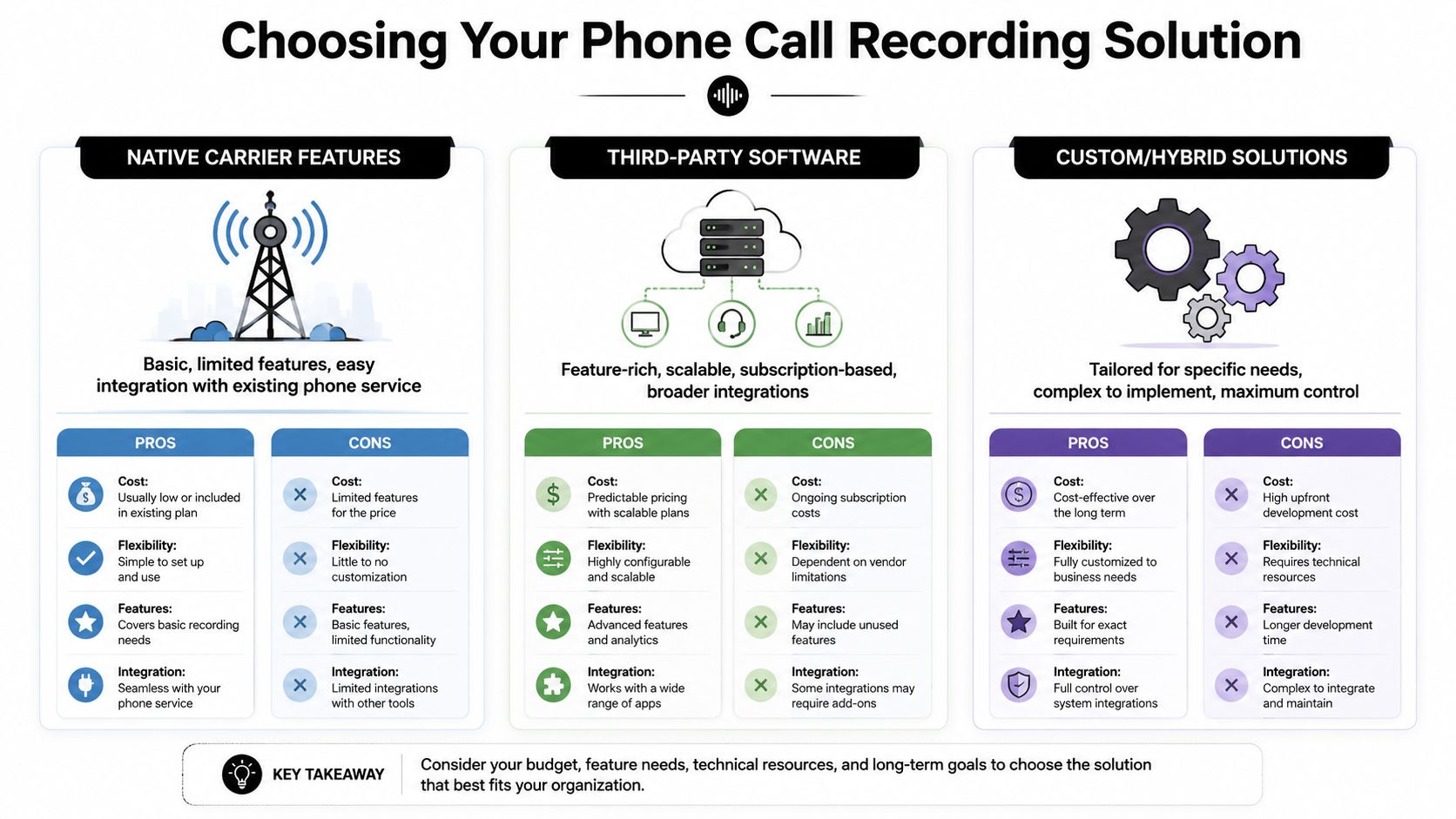
Three common paths
| Option | Best fit | Main limitation |
|---|---|---|
| Native carrier features | Businesses with simple recording needs | Often limited controls and limited workflow depth |
| Third-party recording software | Teams that need features without replacing the full phone system | Can create a separate data silo |
| Integrated cloud communications platform | Growing businesses that want recording tied to routing, analytics, and user management | Requires a broader platform decision |
What to evaluate before signing
Don't stop at “does it record.” Look closer at how the system behaves after capture.
- Security controls: Ask how recordings are stored, who can access them, and whether permissions can be limited by role.
- Retention management: Make sure admins can control deletion and archive behavior in a deliberate way.
- Search and retrieval: If finding one call takes too long, your team won't use the system well.
- Workflow integration: The recording should connect to QA review, CRM context, support queues, and appointment booking processes.
- Mobile reality: If staff work from mobile devices, the platform should support that environment without relying on unreliable workarounds.
One option in this category is Cloud Vision Technologies' cloud contact center platform, which combines cloud calling, call recording, analytics, and contact center functions in one environment. That kind of unified model is often easier to govern than stitching together separate apps.
Buy for retrieval and control, not just capture. Recording that nobody can find or safely manage becomes clutter with legal exposure.
Phone Call Recording Frequently Asked Questions
Is storing recordings securely really that different from storing other files
Yes. Recorded calls often contain names, phone numbers, payment discussions, health details, legal intake information, or appointment booking data. That makes storage policy important.
Use a system with controlled access, role-based permissions, and clear retention rules. Limit who can listen to audio, who can read transcripts, and who can export anything. If your business handles regulated data, your storage and breach response processes need to match that risk.
Can employees record business calls on mobile phones
Sometimes, but mobile behavior is inconsistent. Google explains that Android call recording is device- and policy-dependent, with automatic recording options for some scenarios, manual in-call recording on non-Pixel devices, Pixel access through Call Assist, and admin or user controls for automatic deletion of recordings in this Google Phone app recording help documentation.
That variability is why many businesses prefer platform-level recording instead of depending on whatever each employee phone happens to support.
Will recording hurt call quality
In a properly designed cloud or VoIP environment, recording usually shouldn't create a noticeable issue for the caller or employee. The bigger risks to quality are poor network conditions, weak devices, or badly designed apps, not the idea of recording itself.
If quality problems appear after recording is enabled, check the overall phone environment first. Don't assume the record function is the only cause.
If your business is replacing an older phone setup or wants a cleaner way to manage call recording, routing, AI intake, and appointment booking in one place, Cloud Vision Technologies LLC is one option to evaluate. CVT provides cloud communications tools including Hosted VoIP, an AI Voice Agent, contact center software, and call recording features that can support compliance review, analytics, and day-to-day customer handling without on-premise hardware.